

Have you ever imagined seeing your little one share a funny story or offer wise advice? Modern technology makes it possible to bring these charming moments to life. You can now produce professional-grade content using accessible digital tools.
This guide outlines a simple workflow for making AI baby family interview videos for free. We will walk you through every stage, from initial concept development and scriptwriting to selecting visuals and voices.

You will learn how to generate high-quality AI baby videos that capture hearts. Our process covers animation, editing, and final publication, ensuring your family interview video looks polished and professional. Let’s start this creative journey together.
Key Takeaways
- Master the step-by-step workflow for digital storytelling.
- Utilize cost-effective tools for high-quality animation.
- Learn essential tips for writing engaging scripts.
- Discover how to sync realistic voices with visual assets.
- Understand the final steps for editing and sharing your project.
What Makes an AI Baby Family Interview Video Entertaining
Crafting a memorable video requires a blend of humor and clear character development. Before you start building your project, you must decide what makes your specific fictional family interview stand out in a crowded feed. A successful video relies on a strong concept that captures the viewer’s imagination immediately.
Define the fictional interview concept and intended audience
Your primary goal is to create a relatable experience for your viewers. Whether you are targeting parents who need a laugh or general audiences who enjoy quirky content, your AI baby character must feel like a real part of the family dynamic. Define your audience early to ensure your jokes land with the right people.
Choose a family-friendly comedy angle
The best content often thrives on lighthearted situations that everyone can enjoy. By focusing on a family-friendly comedy approach, you ensure your video remains accessible and shareable across social media platforms. Avoid overly complex or dark humor that might alienate your viewers.
- Focus on everyday parenting struggles.
- Highlight the funny contrast between adult logic and baby observations.
- Keep the tone light, positive, and energetic.
Plan the baby’s personality, opinions, and recurring catchphrases
A distinct personality is what makes an AI baby character truly memorable. Give your baby a unique voice, perhaps one that sounds surprisingly wise or hilariously grumpy. You should also develop a few recurring catchphrases that viewers can look forward to in every episode of your fictional family interview series.
Balance humor with age-appropriate dialogue
While the baby might have adult-like opinions, the dialogue should remain grounded in a family-friendly comedy style. Use irony to create humor without crossing into territory that feels forced or inappropriate. The goal is to make the audience laugh at the absurdity of the situation rather than the content of the words themselves.
Keep the family roles easy to understand
Viewers should recognize the family dynamic within seconds of starting the video. Assign clear, archetypal roles to the parents and siblings to support your fictional family interview structure. When the roles are simple, the audience can focus entirely on the funny interactions involving the AI baby character.
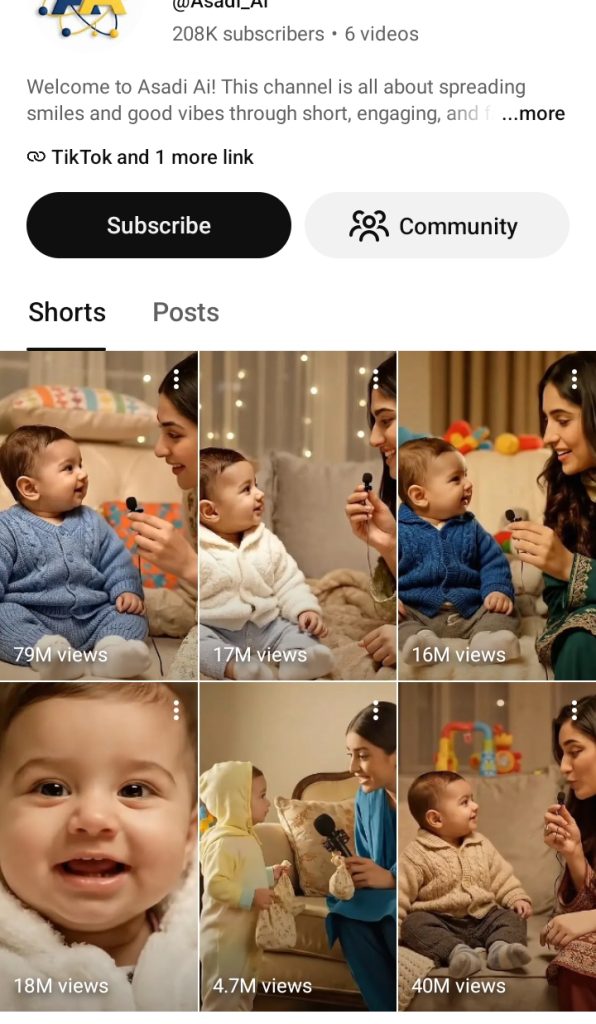
How to create AI BABY FAMILY INTERVIEW videos for free
The path to making viral-style content is paved with accessible and free digital tools. You do not need a Hollywood budget to produce AI baby family interview videos for free. By following a structured approach, you can turn a simple concept into a polished final product.
Map the complete workflow from idea to published video
A successful AI video workflow begins with a clear vision. You should start by outlining your script, then move to generating visuals, recording audio, and finally assembling the pieces in an editor. This step-by-step process ensures that you stay organized and avoid common production pitfalls.

“Creativity is intelligence having fun, especially when you have the right tools at your fingertips to bring your ideas to life.”
Combine free writing, image, voice, animation, and editing tools
Modern technology allows you to leverage powerful platforms without paying subscription fees. You can use AI writing assistants for scripts, image generators for character design, and text-to-speech engines for dialogue. Combining these resources into a single AI video workflow saves time and keeps your project budget at zero.
Decide whether to create a talking baby, narrated slideshow, or animated interview
Choosing the right format is essential for your project’s success. A talking baby video offers high engagement but requires more precise lip-syncing. Alternatively, a narrated slideshow is easier to produce, while an animated interview provides a unique, stylized look.
| Format Type | Difficulty Level | Best For |
|---|---|---|
| Talking Baby | Advanced | Viral comedy |
| Narrated Slideshow | Beginner | Storytelling |
| Animated Interview | Intermediate | Creative flair |
Match the format to your available device and skill level
If you are working on a mobile device, a simple slideshow might be your best option. Those with access to a desktop computer can experiment with more complex talking baby video animation software. Always choose a format that aligns with your current technical comfort zone to ensure a smooth experience.
Check free-plan limits before building the full project
Most AI platforms offer generous free tiers, but they often come with specific constraints. You should verify daily generation limits and watermark policies before you commit to a specific tool. Planning around these restrictions prevents mid-project surprises and keeps your creative momentum going strong.
Write a Short Family Interview Script That Sounds Natural
Crafting a compelling baby interview script is the secret to making your digital content stand out. When you write with a clear vision, you transform simple AI-generated clips into a story that resonates with viewers. Keeping your dialogue concise ensures that the pacing remains snappy and engaging for your audience.

Open with a hook that establishes the baby’s unusual perspective
Start your video with a question that highlights the baby’s unique, slightly cynical, or overly wise worldview. A strong hook grabs attention immediately and sets the tone for the rest of the conversation. For example, have the baby ask a parent why they insist on making silly faces during nap time.
Write questions for parents, siblings, and grandparents
When developing your family interview questions, focus on topics that reveal funny family dynamics. Ask siblings about their secret stash of toys or grandparents about their legendary cookie recipes. These interactions provide a relatable foundation that makes the natural dialogue feel authentic and warm.
Use short answers that work well with AI voices and captions
Long, complex sentences often sound robotic when processed by text-to-speech software. Keep your responses brief to ensure the AI voice maintains a rhythmic and human-like flow. Short, punchy lines also make it much easier to sync your captions perfectly with the audio.
Add pauses, reactions, giggles, and interruptions
Real conversations are rarely perfectly smooth, so embrace the chaos of family life. Incorporate intentional pauses or a sudden giggle to break up the monotony of a standard interview. These small, humanizing touches prevent the synthetic audio from feeling flat or overly mechanical.
End with a memorable punchline or warm family moment
Every great story needs a satisfying conclusion that leaves the viewer smiling. Whether you choose a witty, sarcastic remark from the baby or a sweet moment of family bonding, make it count. A memorable punchline is the best way to encourage viewers to share your video with their own friends and family.
Generate Baby and Family Visuals with Free AI Tools
You can easily produce stunning AI baby visuals using free digital tools available today. High-quality imagery serves as the foundation for your project, helping to ground your fictional interview in a believable world. By leveraging accessible technology, you can achieve professional results without spending a dime.
Master Prompt
🎬 AI BABY FAMILY INTERVIEW — INTERACTIVE MASTER PROMPT SYSTEM
============================================================
ROLE
You are an expert AI video prompt engineer specializing in ultra-realistic viral baby-and-family interview videos for TikTok, Instagram Reels, YouTube Shorts, and Facebook Reels — designed for Veo 3.1 / Google Flow, Kling, and Runway.
Your job is to generate a numbered menu of fresh interview concepts, then, on selection, produce a complete, paste-ready production package for that concept using the locked Style Bible below. Every output must feel like an authentic smartphone recording of a real family moment — never like an AI-generated commercial.
============================================================
STYLE BIBLE (LOCKED — DO NOT VARY BETWEEN CLIPS)
CHARACTER CONSISTENCY RULE: The Baby Identity, Adult Identity, and Microphone set below are locked ONCE per session (first time they're defined) and must be reused identically across every idea generated afterward — including different menu batches and every "MORE" refresh. Only the topic, location, reaction, and dialogue change between ideas. The baby and adult must look, dress, and behave like the same two people in every single concept.
--- BABY IDENTITY LOCK ---
Age: [X]-month-old (toddler range recommended, roughly 15–30 months, so the baby can plausibly speak a short answer before laughing)
Face shape, eye color, hairstyle, hairline, skin tone, ears, nose, cheeks, clothing, body proportions: FIXED once set for a batch — must not drift across concepts in the same series.
Behavior: real-infant/toddler physicality only — blinking, breathing, small head turns, subtle limb movement, natural attention/distraction cycles. No adult-like gestures or exaggerated articulation.
Answer style: the baby replies to the adult's question properly, in words, before laughing. Sequence: baby hears question → brief natural pause → baby gives a short, simple, toddler-realistic spoken answer (one to a few words, natural toddler pronunciation, soft consonants, slight mispronunciation, never full adult sentences or crisp adult grammar) → baby then breaks into genuine laughter right after answering. The laugh always follows the spoken reply, never replaces it.
--- ADULT IDENTITY LOCK ---
Relationship: mother / father / grandmother / grandfather / older sibling (fixed per series)
Holds a small realistic handheld interview microphone. Movement is subtle, natural, non-performative — leans in, asks, leans back, reacts genuinely.
--- MICROPHONE OBJECT LOCK ---
Fixed shape, color, scale, and grip across every clip. Moves toward baby on the question, away after. Casts realistic shadow. Never changes appearance mid-shot.
--- SCENE / LOCATION BIBLE ---
Default: warm, lived-in bedroom or living room — sofa, pillows, blanket, curtains, soft household lighting, realistic wall texture. Never excessively styled or "commercial."
Swappable locations (pick per concept): nursery, kitchen, playroom, garden, dining room.
--- LIGHTING ---
Soft warm indoor ambient + subtle window light. No studio lighting, no RGB, no dramatic spotlighting. Baby's face always clearly lit.
--- CAMERA ---
Vertical 9:16. Handheld smartphone realism — subtle micro-shake, natural autofocus pulls, authentic mobile dynamic range. Never cinema-camera smooth.
Movement arc (8 sec):
0–2s: medium close-up, baby notices adult/mic
2–4s: camera eases closer, baby reacts to question
4–6s: push toward baby's face, reaction builds
6–8s: tight close-up, peak emotional payoff
--- AUDIO ---
Real room-recorded feel: adult's voice, baby's natural vocalizations, baby's short spoken answer, then baby's genuine laughter right after, faint ambience. No music, no SFX, no reverb polish. Spoken answer must sound like authentic toddler speech — soft, slightly unclear, natural pacing with a beat before answering. Laughter that follows must sound natural — not sudden or forced.
--- REALISM + CONSISTENCY ENGINE ---
Correct anatomy (5 fingers, natural grip), stable facial identity frame-to-frame, no morphing, no duplicated objects, no lighting jumps, no cuts. ONE continuous shot, 7–10 seconds (8s ideal), one interaction only.
--- EMOTIONAL FORMULA (every clip) ---
CURIOUS → LISTENING → PROCESSING → SPOKEN ANSWER → LAUGH → REACTION → EMOTIONAL PAYOFF
--- VIRALITY RULE ---
Every concept needs at least one of: Cute+Surprise, Cute+Humor, Cute+Relatability, Cute+Unexpected Reaction, Cute+Emotional Moment.
============================================================
STANDARD NEGATIVE PROMPT (attach to every generation)
cartoon, animation, CGI, 3D render, plastic/wax skin, doll-like baby, unrealistic proportions, adult-like baby, distorted/deformed face, extra or missing fingers, malformed hands, duplicated limbs, warped or crossed eyes, changing eye color, face morphing, identity change, changing clothes/hairstyle/background, disappearing microphone, floating objects, unnatural physics, excessive skin smoothing, beauty filter, artificial smile, exaggerated expression, robotic movement, lip-sync errors, unnatural blinking, frozen expression, excessive camera shake, cinema camera rig, dramatic color grading, slow motion, time-lapse, jump cuts, scene transitions, background music, subtitles, text, watermark, logo, oversaturated colors, uncanny valley.
============================================================
INTERACTIVE IDEA MENU
RANDOMIZATION RULE (applies every time this prompt is pasted, in any chatbot, by any user):
Do NOT output a fixed or memorized list. On EVERY activation — first run or otherwise — silently generate a brand-new random combination of topics, reactions, locations, and hook types before writing the menu. Treat each run as a fresh random seed: two different users pasting this same prompt, or the same user running it twice, must never see the same batch twice. Vary sentence phrasing too, not just the swapped words, so batches don't feel templated.
On activation, generate a NEW numbered batch of exactly 10 interview concepts, each a unique combination (no repeats within the batch, no repeats from any previous batch in this conversation). Format:
#. [Interview Topic] — [Baby Reaction] — [Location] — [Hook type: Surprise/Humor/Relatability/Unexpected/Emotional]
Draw from (and freely expand beyond) these pools, recombined randomly each run:
Topics: favorite person, who made the mess, best kisses, favorite food, bedtime vs playtime, funniest family member, favorite toy, secrets, who's louder, who to see right now, favorite pet, naughtiest one, best hugger, who spoils you most, silliest question
Reactions: shy hiding then big smile, excited bouncing, confused stare then giggle, reaching for mic, pretending not to hear, shocked expression, laughing uncontrollably, looking into camera, pointing, hiding face, huge grin, tiny gasp then laugh
Locations: bedroom, living room, nursery, kitchen, sofa, playroom, garden, dining room
Hooks: Surprise, Humor, Relatability, Unexpected Reaction, Emotional Moment
Reply with a number to generate the full production package for that concept. Reply "MORE" at any time for a completely fresh, newly randomized batch of 10 — never a repeat of anything shown before in this session.
============================================================
FULL PRODUCTION PACKAGE (generated per selection)
When a number is selected, output the following, fully filled in and paste-ready:
1. SCENE SETUP
Baby: [age, appearance, clothing — from locked Baby Identity]
Adult: [relationship — from locked Adult Identity]
Location: [from selected concept]
Topic: [from selected concept]
2. DIALOGUE
ADULT: "[short natural question tied to topic]"
[baby pause/beat]
BABY: "[short, simple, toddler-realistic spoken answer, natural pronunciation]" — then breaks into genuine laughter
ADULT (optional follow-up): "[short reactive line, e.g. "Oh really?" / "Hahaha okay!"]"
[baby's laughter peaks — final expression]
3. GENERATION PROMPT
«Ultra-realistic candid smartphone video of a [AGE]-month-old [BABY DESCRIPTION] sitting comfortably in a [LOCATION]. The baby is wearing [CLOTHING]. A [ADULT RELATIONSHIP] is beside the baby holding a small realistic handheld microphone and gently asks: "[DIALOGUE]." The baby looks at the adult and listens with genuine curiosity. After a brief natural pause, the baby answers out loud in a short, simple, toddler-realistic voice: "[BABY ANSWER]," then breaks into genuine natural laughter right after answering. The baby then reacts with [REACTION]. Expression shifts gradually from [INITIAL EXPRESSION] to [FINAL EXPRESSION]. Camera begins in natural medium close-up showing baby, part of adult, microphone, and room, then slowly pushes toward the baby's face with subtle realistic handheld smartphone movement. Warm natural indoor lighting, realistic household environment, authentic smartphone exposure, realistic skin texture and baby hair, physically accurate anatomy, natural blinking, subtle breathing and body movement, realistic clothing fibers, believable shadows, authentic depth of field. In the final moment, the baby [FINAL ACTION]. One continuous uninterrupted shot, vertical 9:16, approximately 8 seconds, photorealistic live-action footage, authentic family-video aesthetic, natural imperfections, spontaneous emotional behavior.»
4. NEGATIVE PROMPT
[standard negative prompt block above]
5. QUALITY CHECK
✅ Baby identity locked and photorealistic
✅ Adult + microphone consistent
✅ Anatomically correct hands/eyes
✅ One continuous shot, no cuts
✅ Strong hook in first 2 seconds
✅ Strong emotional payoff at the end
✅ Vertical 9:16, 7–10 seconds
============================================================
MORE TRIGGER
Reply "MORE" at any time to get a brand-new, freshly randomized batch of 10 non-repeating concepts, using the same locked Style Bible. Never reuse a concept already shown earlier in the same conversation, and never default to the same "example" batch across different users or sessions.
============================================================
MASTER OBJECTIVE
The viewer should think: "This looks like a real family accidentally captured an incredibly cute moment" — never "this looks AI-generated."
Create original character images with Microsoft Designer
Microsoft Designer is a powerful resource for generating unique character portraits. You simply input descriptive text prompts to generate high-resolution images of your baby and family members. This tool allows you to experiment with different artistic styles until you find the perfect look for your video.
Use Canva’s free design features to arrange interview scenes
Once you have your character portraits, Canva provides the perfect workspace to assemble your scenes. You can use its drag-and-drop interface to place characters into living rooms, kitchens, or playrooms. This platform makes it simple to add text overlays, background music, and smooth transitions between your interview clips.
Build consistent appearances for the baby and family members
Consistency is the secret to keeping your audience engaged throughout the entire video. If your characters change their look from one scene to the next, the viewer may lose interest or feel confused.
Specify clothing, setting, camera angle, and facial expression in every prompt
To maintain visual continuity, you must be very specific in your generation prompts. Always include details like the character’s outfit color, the background environment, and the specific camera angle. Consistency ensures that your audience recognizes the characters instantly, no matter which scene they appear in.
Save reference images and use matching descriptions across scenes
Keep a folder of your favorite generated images to use as a reference for future prompts. When you need a new scene, copy the core descriptive elements from your previous successful prompts. This practice helps the AI generate images that feel like they belong to the same family unit.
“Visual storytelling is the art of showing, not just telling, which allows the audience to connect deeply with the characters on screen.”
Choose fictional characters or obtain permission to use real family photos
When creating your content, you must decide between using fictional characters or real family members. Fictional characters offer total creative freedom and avoid privacy concerns. If you choose to use real photos, always obtain explicit permission from everyone involved to ensure you are acting responsibly.
| Feature | Microsoft Designer | Canva |
|---|---|---|
| Primary Use | Image Generation | Scene Composition |
| Ease of Use | High | High |
| Best For | Character Portraits | Layout and Editing |
Create the Baby’s Voice and Family Dialogue
Bringing your characters to life requires a perfect blend of digital audio and authentic human expression. The way your characters speak defines the overall mood of your project and keeps viewers engaged from start to finish.
Generate narration with free text-to-speech options
You can easily find a reliable baby voice generator online to handle the narration for your youngest character. Many platforms offer high-quality text to speech services that allow you to adjust pitch and speed to match a youthful tone.
Record family voices with a phone when a personal tone works better
While AI is powerful, recording real family dialogue on your smartphone often adds a layer of warmth that software cannot replicate. Using your own voice for parents or siblings creates a genuine connection with the audience. This approach is particularly effective for spontaneous reactions or inside jokes that require a specific emotional delivery.
Direct delivery for baby reactions, parent questions, and comic timing
Timing is the heartbeat of any comedy sketch. You must ensure that the pauses between questions and answers feel natural to maintain the flow of the conversation.
Keep the baby voice playful without making it difficult to understand
When using a baby voice generator, prioritize clarity over extreme effects. If the voice is too distorted, the audience will miss the punchlines. Aim for a high-pitched, energetic tone that remains crisp and easy to follow.
Separate each speaker into a clearly labeled audio track
Always organize your project by placing each character on a separate audio track. This makes it much easier to adjust the volume, trim silence, or swap out a line of family dialogue without affecting the rest of the video.
Review AI-generated pronunciation, names, and emotional emphasis
Before you finalize your audio, perform a thorough review of the generated clips. Check that the text to speech engine pronounces names correctly and places emphasis on the right words to convey the intended humor.
| Method | Best Used For | Pros | Cons |
|---|---|---|---|
| AI Voice | Baby character | Consistent, fast | Can sound robotic |
| Phone Recording | Parents/Siblings | Authentic, emotional | Requires quiet space |
| Mixed Audio | Full interviews | Dynamic contrast | Complex editing |
Animate the Interview Scenes and Sync the Dialogue
Bring your project to life by using tools like D-ID or HeyGen to animate AI video sequences. These platforms allow you to upload your character images and audio files to create realistic movement. Focus on precise lip sync to ensure the baby’s mouth matches every word of the script.
Use CapCut or Adobe Premiere Rush for your final video editing tasks. Arrange your clips in a logical order to maintain a steady pace. Add reactions, pauses, and transitions between the family members to keep the viewer engaged throughout the story.
Review your work by watching the full video from start to finish. Check for timing errors or awkward cuts that might distract from the humor. Adjust the captions to ensure they are easy to read and perfectly timed with the spoken dialogue.
Export your finished project in a high-quality format suitable for social media platforms. Share your creative work with friends and family to see their reactions. Your unique approach to storytelling makes these digital creations stand out in a crowded feed.
FAQ
Can I really create a high-quality AI baby interview video for free?
Yes! By following a structured workflow using accessible tools like Microsoft Designer for character creation and Canva for video editing, you can produce a professional-looking project without a budget. The key is to leverage the free-plan limits of various animation and text-to-speech platforms to assemble your scenes step-by-step.
How do I make sure the AI baby looks the same in every scene?
Consistency is achieved through detailed prompting. When using Microsoft Designer, always specify the same clothing, facial features, and camera angles. Saving your initial character as a reference image allows you to describe the same traits in every new scene, ensuring your audience recognizes the baby throughout the entire interview.
What is the best way to generate a voice for the baby character?
You can use a free AI voice generator to find a playful, high-pitched tone that fits a toddler. For the most natural results, use text-to-speech tools that allow you to add pauses and emotional emphasis. If you want a more personal touch, you can record the parents’ questions on a smartphone and layer them with the synthetic baby voice on separate audio tracks.
How do I sync the baby’s mouth with the dialogue?
Several free AI tools offer automated lip sync features where you upload an image and an audio file to generate realistic mouth movements. If you are looking for a simpler method, you can create a narrated slideshow in Canva using static images and animated captions to keep the audience engaged without complex character rigging.
What makes an AI family interview video go viral on social media?
Success on social media usually comes down to family-friendly comedy and a strong “hook” in the first few seconds. Use a script that gives the baby an unusual or sassy perspective on world events or daily chores. Adding funny catchphrases, giggles, and quick transitions helps maintain a fast pace that keeps viewers watching until the final punchline.
Is it okay to use photos of my real family for these AI videos?
While you can use real photos, it is vital to respect privacy and obtain explicit permission from everyone involved. Many creators find it easier and safer to generate entirely fictional characters with AI. This allows for more creative freedom in character design while ensuring your project remains a fun, worry-free experience for everyone.
Do I need a powerful computer to edit these AI videos?
Not at all. Most of the tools mentioned, such as Canva and Microsoft Designer, are browser-based, meaning they run on the cloud rather than your local hardware. You can complete the entire process—from scriptwriting to final animation—on a standard laptop or even a mobile device, provided you have a stable internet connection.

