

Balochistan Public Service Commission Applicants — Urdu + English

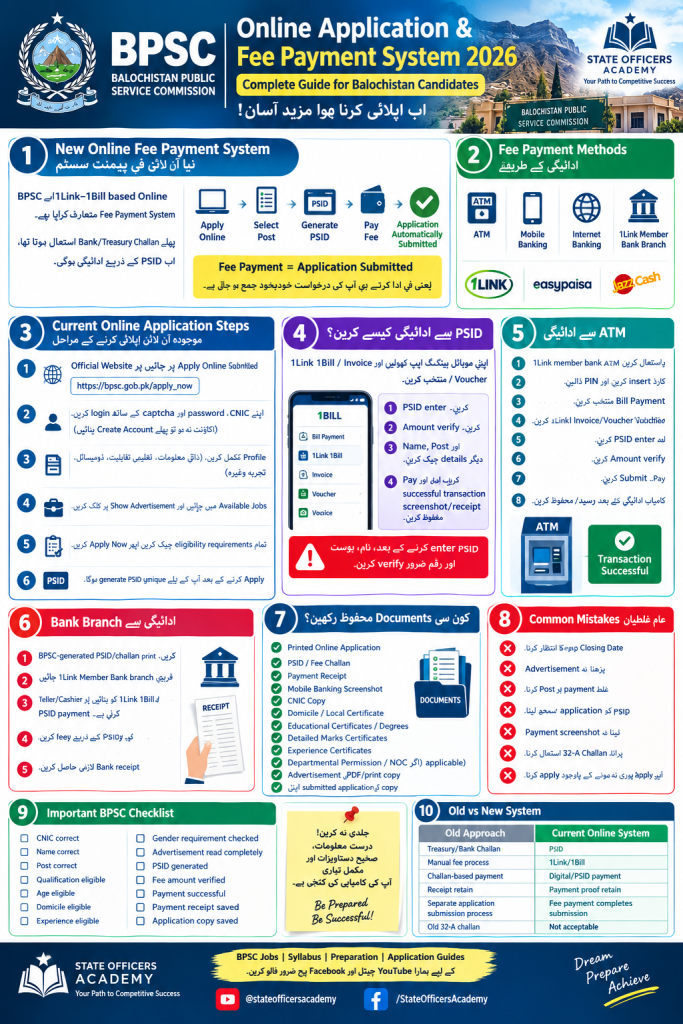
1. سب سے اہم تبدیلی — New Online Fee Payment System
یہ guide Balochistan Public Service Commission کے candidates کے لیے ہے۔ اسے Bihar Public Service Commission کے bpsc 72nd cce، 72nd cce 2026 یا cce 2026 سے متعلق application، exam یا notification نہ سمجھیں؛ 2026 bpsc 72nd اور bpsc 72nd کی معلومات ایک مختلف recruitment process ہیں۔ Balochistan BPSC کی official website اور متعلقہ government notification سے application form، vacancies، posts، dates اور eligibility details ضرور verify کریں۔
پہلے BPSC application میں Bank/Treasury Challan استعمال ہوتا تھا، لیکن موجودہ notification کے مطابق 1Link–1Bill based Online Fee Payment System استعمال کیا جاتا ہے۔ ہر candidate کو official website پر apply online 2026 کر کے application form مکمل کرنا، درست mobile number اور دیگر information درج کرنا چاہیے۔
New process:
Apply Online → Select Post → PSID Generate → Pay Application Fee → Application Automatically Submitted
PSID ہر selected case یا post کے لیے الگ generate ہوتا ہے، جبکہ آپ کا CNIC وہی رہتا ہے۔ Fee pay کرنے سے پہلے candidate کو name، post، application fee، CNIC اور amount verify کرنا چاہیے۔ PSID متعلقہ advertisement کی closing date تک valid رہتا ہے؛ exact dates اور number متعلقہ official website پر چیک کریں۔ BPSC

Fee payment کے available طریقے
آپ generated PSID کے ذریعے pay application fee کر سکتے ہیں:
- 🏧 ATM
- 📱 Mobile Banking
- 💻 Internet Banking
- 🏦 1Link Member Bank Branch — Over the Counter
- BPSC guideline میں Easypaisa/JazzCash سمیت mobile-banking channels کا ذکر بھی ہے؛ payment سے پہلے تازہ information اور service availability check کریں۔ BPSC
2. Current BPSC Online Application Steps
Step 1 — Official Website
اپنی application اور registration کے لیے صرف Balochistan Public Service Commission کی official website استعمال کریں۔ Bihar Public Service Commission، bpsc 72nd cce، 72nd cce 2026 یا cce 2026 سے متعلق کسی الگ application form کو اس portal کے ساتھ نہ ملائیں۔
Apply Online پر click کریں۔ موجودہ portal پر CNIC، password اور captcha کے ذریعے sign-in کیا جاتا ہے۔ Apply online 2026 کرنے سے پہلے website کا address، notification، posts، vacancies اور application dates ضرور verify کریں۔ BPSC
Step 2 — Login
اپنے درج ذیل credentials کے ذریعے login کریں:
- CNIC
- Password
- Captcha
اگر account نہیں ہے تو پہلے Create Account / Join us Now سے registration مکمل کریں۔ Portal اگر email یا mobile number مانگے تو فعال اور درست information درج کریں، کیونکہ login یا application updates اسی کے ذریعے موصول ہو سکتی ہیں۔ BPSC
Step 3 — Profile Complete کریں
اپنی profile میں تمام ضروری information درست درج کریں اور save کرنے کے بعد ہر field دوبارہ check کریں:
- Personal information
- CNIC
- Educational qualification
- Domicile/Local
- Experience
- دیگر required information
BPSC نے candidates کو educational data، متعلقہ documents اور photograph کی information profile میں مکمل رکھنے کی ہدایت دی ہے۔ Profile save ہونے کے بعد candidates must دوبارہ advertisement پڑھیں تاکہ application form میں qualification، document format، email، mobile number اور دیگر required details درست درج ہوں۔ BPSC
Step 4 — Available Jobs
Login کے بعد:
Available Jobs → Show Advertisement
پر جائیں۔
اپنے مطلوبہ post کا advertisement مکمل پڑھیں اور متعلقہ examination، exam dates، vacancies، fee اور application process کی details نوٹ کریں۔ اگر کوئی notification BPSC 72nd، 2026 BPSC 72nd یا 72nd CCE کے نام سے ہو تو اس کی public service commission اور jurisdiction پہلے verify کریں۔
Step 5 — Eligibility Check
Apply Now صرف اسی وقت کریں جب آپ متعلقہ advertisement کی تمام eligibility requirements پوری کرتے ہوں:
- Qualification
- Age
- Gender
- Domicile/Local
- Experience
- Required subject/degree
- دیگر advertisement-specific conditions
BPSC واضح کرتا ہے کہ eligibility check کرنا candidate کی ذمہ داری ہے۔ Application submit کرنے سے پہلے form، documents، registration details اور required information کو official notification سے ملائیں؛ غلط یا نامکمل eligibility کی صورت میں application مسترد ہو سکتی ہے۔ BPSC
3. PSID کیسے Generate ہوگا؟
Eligible post پر Apply Now کرنے اور application form کی بنیادی information مکمل کرنے کے بعد BPSC portal آپ کے لیے ایک unique PSID generate کرے گا۔ Apply online 2026 process میں PSID متعلقہ post، application fee اور selected case کے ساتھ منسلک ہوتا ہے۔
یہ PSID pay application fee کرنے کے لیے استعمال ہوگا، لیکن PSID generate ہونا application submission نہیں ہے۔ Candidates کو successful payment، transaction record اور application status کی تصدیق کرنا ضروری ہے۔
مثال:
Post: Assistant Director BPS-17
CNIC: 12345-1234567-1
PSID: XXXXXXXX
Important: اوپر دیا گیا CNIC صرف فرضی format ہے؛ اپنی حقیقی number یا photograph کسی public جگہ share نہ کریں۔ ہر selected case یا post کے لیے الگ PSID ہو سکتا ہے، جبکہ CNIC same رہتا ہے۔ 72nd cce، bpsc 72nd cce یا cce 2026 کی application کو اس Balochistan BPSC process سے نہ ملائیں۔ BPSC
4. Mobile Banking سے Fee کیسے Pay کریں؟
اپنی banking یا mobile-payment application کھولیں اور registered mobile number کے ذریعے login کریں۔
عام طور پر:
Bill Payment → 1Link 1Bill / Invoice / Voucher
select کریں۔ Bank کے لحاظ سے menu کے نام یا steps مختلف ہو سکتے ہیں، اس لیے متعلقہ notification اور payment instructions بھی دیکھیں۔
پھر:
PSID Enter کریں → Amount Verify کریں → Pay
BPSC کے مطابق PSID enter کرنے کے بعد payable amount automatically fetch/display ہونا چاہیے۔ Payment سے پہلے CNIC، name، post، eligibility اور fee amount لازماً verify کریں۔ Successful transaction کے بعد receipt، screenshot اور transaction ID محفوظ رکھیں؛ یہ application، exam یا document verification کے وقت مفید ہو سکتے ہیں۔ BPSC
⚠️ Golden Rule
PSID enter کرنے کے بعد Name, Post, CNIC اور Amount کو verify کیے بغیر payment نہ کریں۔ PSID generation application submission نہیں ہے؛ application اسی وقت مکمل سمجھی جائے گی جب fee payment successful ہو۔
5. ATM سے Payment
- 1Link member bank ATM استعمال کریں۔
- ATM card insert کریں۔
- PIN enter کریں۔
- Bill Payment select کریں۔
- 1Link 1Bill Invoice/Voucher select کریں۔
- BPSC کا PSID enter کریں۔
- Amount اور payment details verify کریں۔
- Pay/Submit کریں۔
- Successful transaction message آنے کے بعد receipt، transaction ID یا record محفوظ کریں۔ BPSC
6. Bank Branch سے Payment
اگر آپ online payment نہیں کرنا چاہتے:
- BPSC-generated PSID/challan print کریں۔
- قریبی 1Link Member Bank branch جائیں۔
- Teller/Cashier کو بتائیں کہ 1Link 1Bill / PSID payment کرنی ہے۔
- PSID کے ذریعے application fee pay کریں اور نام، post اور amount دوبارہ check کریں۔
- Bank receipt لازمی حاصل کریں اور اسے application documents کے ساتھ محفوظ رکھیں۔ BPSC
7. سب سے اہم بات: Payment کے بعد کیا ہوگا؟
یہ نئے online application system کا سب سے اہم حصہ ہے۔ Apply online 2026 process میں fee payment کے بعد اپنی application کا status اور payment confirmation ضرور check کریں۔
Fee payment = Application submission
BPSC کی official guideline کے مطابق fee successfully pay ہونے کے بعد application automatically submitted ہو جاتی ہے۔ Payment successful ہونے پر اسی post کے لیے portal پر مزید information submit کرنے کی ضرورت نہیں رہتی۔ تاہم candidates must confirmation status، transaction ID یا submitted application کا ثبوت محفوظ کریں۔ یہ rule متعلقہ notification کے مطابق verify کریں، کیونکہ ہر public service commission یا Bihar Public Service Commission کا process مختلف ہو سکتا ہے۔ BPSC
یعنی:
PSID Generate ❌ Application complete نہیں
Fee Paid + Successful Transaction ✅ Application Submitted
اگر payment pending ہو تو فوراً دوبارہ fee pay نہ کریں؛ پہلے bank application، receipt، transaction details اور BPSC official website پر status check کریں۔ اگر transaction failed ہو تو official instructions کے مطابق کارروائی کریں۔ Successful status نظر آنے کے بعد ہی application form کو مکمل سمجھیں۔
8. کون سی Documents محفوظ رکھیں؟
Online application اور registration مکمل ہونے کے باوجود اپنا record مکمل محفوظ رکھیں۔ Application form، fee proof اور eligibility documents کو الگ folders میں رکھیں، تاکہ exam، examination یا document verification کے وقت آسانی ہو۔
لازمی طور پر یہ چیزیں save کریں:
☑ Printed Online Application
☑ PSID / Fee Challan
☑ Payment Receipt
☑ Mobile Banking Payment Screenshot
☑ CNIC Copy
☑ Domicile/Local Certificate
☑ Educational Certificates/Degrees
☑ Detailed Marks Certificates
☑ Experience Certificates
☑ Departmental Permission/NOC — اگر applicable ہو
☑ Advertisement کی PDF/print copy
☑ اپنی submitted application کا PDF/screenshot
Payment receipt، PSID اور screenshot کو payment proof کے طور پر محفوظ کریں، جبکہ CNIC، domicile، educational certificates، photograph اور experience documents eligibility record کے طور پر رکھیں۔ CNIC number، email، mobile number یا payment screenshot public platforms پر share نہ کریں۔ BPSC کی current portal instructions کے مطابق hardcopy application یا documents BPSC کو بھیجنے کی ضرورت نہیں؛ printed online application candidate کو اپنے record کے لیے رکھنی چاہیے، جبکہ fee receipt/challan بھی محفوظ رکھنا ضروری ہے اور examination کے وقت پیش کرنا پڑ سکتا ہے۔ Hardcopy rule اور required documents ہمیشہ متعلقہ advertisement، notification اور official website سے verify کریں۔ BPSC
9. Common Mistakes — Candidates کی عام غلطیاں
❌ Mistake #1: Closing Date کا انتظار کرنا
آخری دن application form submit کرنا خطرناک ہو سکتا ہے، کیونکہ portal traffic، payment processing delay یا examination کی dates کے قریب system میں technical مسئلہ پیش آ سکتا ہے۔
Better: apply online process چند دن پہلے مکمل کریں، application status check کریں اور application fee کی payment کے لیے مناسب وقت رکھیں۔
❌ Mistake #2: Advertisement نہ پڑھنا
صرف post کا نام دیکھ کر apply نہ کریں۔ متعلقہ government notification اور advertisement میں qualification، age، domicile، experience، gender، documents اور application form کا required format مکمل پڑھیں۔
Eligibility + Qualification + Experience + Age + Domicile سب check کریں، اور application process کو کسی دوسرے exam، BPSC 72nd یا 72nd CCE کی information کے ساتھ نہ ملائیں۔
❌ Mistake #3: غلط Post پر Payment کرنا
Payment سے پہلے:
CNIC → Name → Post → Fee Amount → Eligibility
verify کریں۔ Candidates must application fee pay کرنے سے پہلے post، application form اور متعلقہ notification کی تمام details دوبارہ check کریں۔
کیونکہ BPSC کے مطابق paid fee non-refundable ہے۔ Refund یا correction کا فیصلہ صرف متعلقہ current guideline کے مطابق ہوگا، اس لیے payment سے پہلے احتیاط کریں۔ BPSC
❌ Mistake #4: PSID کو application سمجھ لینا
PSID generation application submission نہیں ہے۔
Payment successfully complete ہونا ضروری ہے۔ اس کے بعد transaction status، application confirmation اور registration record محفوظ کریں؛ صرف PSID ہونے سے application مکمل نہیں سمجھی جاتی۔
❌ Mistake #5: Payment Screenshot نہ لینا
Successful payment کے فوراً بعد:
Screenshot + Receipt + PSID
محفوظ کریں۔ Transaction ID، payment date اور application status بھی note کریں تاکہ exam یا document verification کے وقت payment proof دستیاب ہو۔
❌ Mistake #6: پرانا Challan استعمال کرنا
نئے online fee mechanism کی effective date کے بعد BPSC نے واضح کیا ہے کہ old Challan Form 32-A، cheque، bank draft اور pay order acceptable نہیں ہیں۔ تاہم candidates کو payment سے پہلے متعلقہ current notification اور official instructions verify کرنی چاہییں، کیونکہ process وقت کے ساتھ تبدیل ہو سکتا ہے۔ BPSC
❌ Mistake #7: Eligibility پوری نہ ہونے کے باوجود Apply کرنا
BPSC کے مطابق qualification، age، gender، domicile، experience اور required documents کی eligibility candidate کی ذمہ داری ہے۔ Application submit کرنے سے پہلے official advertisement کے posts، dates، eligibility اور document requirements check کریں؛ اگر آپ criteria پورا نہیں کرتے تو apply نہ کریں۔ May 2026 یا 2026 BPSC 72nd سے متعلق کسی الگ examination کی eligibility کو اس application کے ساتھ نہ ملائیں۔ BPSC
10. Important BPSC Checklist
Application form شروع کرنے سے لے کر apply online 2026 registration مکمل کرنے اور fee payment کے بعد record save کرنے تک یہ checklist دیکھیں۔ ہر step مکمل ہونے پر Status column میں tick لگائیں۔
| CheckStatus | |
| Official application form اور BPSC details verify | ☐ |
| CNIC correct | ☐ |
| Name، mobile number اور registration information correct | ☐ |
| مطلوبہ post اور application process checked | ☐ |
| Qualification eligible | ☐ |
| Age eligible | ☐ |
| Domicile eligible | ☐ |
| Experience اور required documents checked | ☐ |
| Gender requirement checked | ☐ |
| Advertisement اور notification مکمل پڑھا | ☐ |
| PSID generated | ☐ |
| Fee amount verified | ☐ |
| Payment successful | ☐ |
| Payment receipt اور PSID saved | ☐ |
| Application copy saved for exam یا document verification | ☐ |
11. ایک اہم فرق: Old vs New System
| Old ApproachCurrent Online System | |
| Treasury/Bank Challan | PSID |
| Manual fee process | 1Link/1Bill |
| Challan-based payment | Digital/PSID payment |
| Receipt retain | Payment proof retain |
| Application submission process separate | Fee payment completes submission |
| Old 32-A challan | Not acceptable under new mechanism |
BPSC کی 2026 guideline 1Link–1Bill mechanism کو document کرتی ہے اور بتاتی ہے کہ successful fee payment application automatically submit کر دیتی ہے۔ Candidates کو پہلے advertisement، posts، vacancies، eligibility، dates اور متعلقہ government notification پڑھنی چاہیے؛ پھر application form مکمل کر کے PSID generate، fee pay اور receipt محفوظ کرنی چاہیے۔
Apply online 2026 کرنے سے پہلے Balochistan BPSC کی official website پر تازہ information، examination details، exam schedule اور registration instructions verify کریں۔ اس guide کو Bihar Public Service Commission کے bpsc 72nd cce، 72nd cce 2026، 72nd CCE، bpsc 72nd، 2026 bpsc 72nd یا cce 2026 کی application، exam یا exams کے ساتھ نہ ملائیں؛ یہ الگ public service commission کا process ہے۔ اگر notification May 2026 یا کسی دوسرے سال سے متعلق ہو تو form اور application details اسی official website سے چیک کریں۔ Public service examination کے لیے اپنا درست email، mobile number اور دیگر information محفوظ رکھیں۔
BPSC Online Application & Fee Payment 2026 — FAQs
1. What is the new BPSC fee payment system?
BPSC has introduced an online fee payment facility through 1Link–1Bill. Applicants can pay their application fee electronically using the PSID generated through the BPSC online application portal. The facility became available from 5 May 2026. BPSC
2. What does PSID mean?
PSID is the unique payment identifier generated by the BPSC online portal after you apply for an eligible post. You use this number to pay your application fee through supported 1Link payment channels.
3. How can I apply for a BPSC job online?
Go to the official BPSC website and select Apply Online. Log in using your CNIC, go to Available Jobs, select Show Advertisement, and click Apply Now for the post for which you meet all eligibility requirements. BPSC
4. Do I need a BPSC account to apply online?
Yes. If you do not already have an account, use Create Account and provide your name, CNIC, email address, mobile number, and password. BPSC
5. How do I log in to the BPSC portal?
You can sign in using your CNIC, password, and captcha through the BPSC Online Job Portal. BPSC
6. Where can I find current BPSC vacancies?
After logging in, open Available Jobs. The portal lists currently available posts and provides an Apply Now option for each vacancy. BPSC
7. When is the PSID generated?
After you select Apply Now for an eligible post, the system generates a receipt/challan containing a unique PSID for fee payment. BPSC
8. Can I pay the BPSC fee through an ATM?
Yes. BPSC allows payment through an ATM of a 1Link member bank. Select Bill Payment, choose 1Link 1Bill Invoice/Voucher, enter your PSID, verify the amount, and complete the transaction. BPSC
9. Can I pay the BPSC fee through mobile banking?
Yes. BPSC supports mobile banking channels, including banking apps and services such as Easypaisa and JazzCash, subject to the available 1Link/1Bill payment option. Enter your PSID, verify the automatically retrieved amount, and complete the payment. BPSC
10. Can I pay through Internet Banking?
Yes. Select the 1Link 1Bill Invoice/Voucher payment option in your internet banking service, enter the BPSC PSID, verify the amount, and submit the payment. BPSC
11. Can I pay the fee at a bank branch?
Yes. You can visit a nearby 1Link Member Bank Branch and ask the teller/cashier to process the payment against your PSID through the 1Link 1Bill Invoice/Voucher option. Keep the bank receipt for your records. BPSC
12. How do I know how much fee I have to pay?
After entering your PSID into a supported 1Link payment channel, the due amount should be automatically fetched and displayed. Always verify the amount before pressing Pay/Submit. BPSC
13. What should I do after successful payment?
Save the payment receipt or a screenshot of the successful transaction. BPSC’s payment instructions specifically advise applicants to take a screenshot or download the payment receipt. BPSC
14. Does paying the fee automatically submit my application?
Yes, under the new online fee mechanism. BPSC’s guideline states that once the fee is successfully paid, the application is automatically submitted, and no further information needs to be submitted for that post through the portal. BPSC
15. Do I need to send a hard copy of my online application to BPSC?
No. BPSC’s current online portal states that no hard copy of the application or copies of documents are required to be forwarded to BPSC. However, applicants should retain the printed online application for their own record. BPSC
16. Should I keep my payment receipt?
Absolutely. Keep your PSID, payment receipt, and transaction screenshot safely. BPSC advises applicants to preserve their payment record and other application documents. BPSC
17. Can I send the old Bank Challan or Treasury Receipt to BPSC?
No. Under the current online fee mechanism, applicants should not send the Bank Challan/Treasury Receipt to BPSC. Keep your payment record safely for your own use. BPSC
18. Can I use the old 32-A challan, cheque, bank draft, or pay order?
For applications covered by the new online fee mechanism, no. BPSC’s 2026 guideline states that the old Challan Form 32-A, cheque, bank draft, and pay order are not acceptable under the new mechanism. BPSC
19. What documents should I keep after applying?
Keep copies of:
- Printed online application
- PSID/payment document
- Payment receipt
- Payment screenshot
- CNIC
- Domicile/Local certificate
- Educational certificates and DMCs
- Experience certificates, where applicable
- NOC/Departmental Permission, where applicable
- Relevant advertisement
BPSC also advises candidates to complete their profiles with educational data and upload relevant degree/DMC and other documents before applying. BPSC
20. What if I enter the wrong information?
Do not assume that payment can be reversed or corrected. Carefully verify your CNIC, name, post, eligibility, fee amount, and other information before payment. BPSC warns candidates against submitting applications without the required qualification, experience, gender, religion, local/domicile and other requirements. BPSC
21. Can I apply if I do not meet the advertised eligibility requirements?
No. You should apply only when you satisfy all requirements specified in the advertisement. BPSC specifically warns against applications submitted without the required qualification, experience, gender, religion, local/domicile and other conditions. BPSC
22. What happens if I wait until the last day?
This is risky. BPSC itself displays the warning “Don’t Wait for the closing date, APPLY NOW.” Applications submitted after the specified closing date are not accepted. BPSC
23. What should I do if I forget my BPSC password?
Use the Forgot Password option on the BPSC portal and enter your verified CNIC to begin the password recovery process. BPSC
24. What if I have a technical problem while applying?
BPSC currently lists 081-9203264 for technical assistance regarding online applications during office hours, Monday to Friday. BPSC
25. Is the BPSC online application process completely paperless?
For the online application itself, BPSC states that hard copies of the application and documents do not need to be forwarded to the Commission. However, candidates should retain their application and payment records. BPSC
26. What is the complete BPSC online application process?
The simplified process is:
Create/Login to Account → Apply Online → Available Jobs → Show Advertisement → Apply Now → Generate PSID → Pay Fee through 1Link → Save Receipt → Application Automatically Submitted BPSC
27. What is the most important thing candidates should remember?
Do not consider the application complete merely because you generated a PSID.
The critical sequence is:
PSID Generated → Fee Paid Successfully → Application Automatically Submitted
Then save your payment receipt and application copy for future reference.