

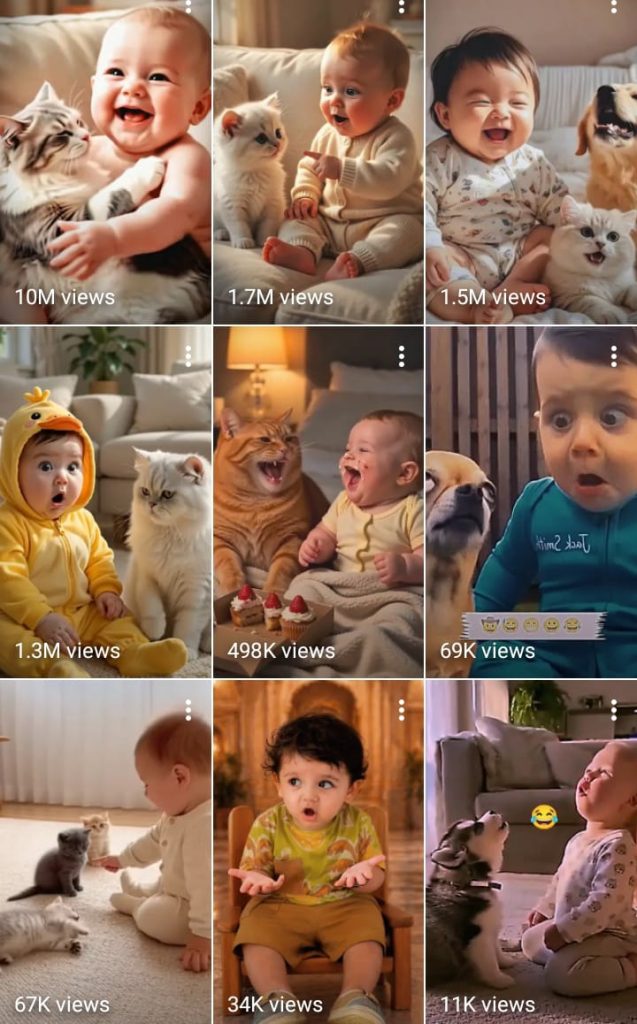
How to create AI Baby & Cat Question Videos Step by Step:- Welcome to the exciting world of viral digital content. You have likely noticed those charming, talking characters taking over your social media feeds lately. These clips are capturing hearts across the United States by blending humor with modern technology.
Our goal is simple: we want to help you master the art of production. By following this friendly, step-by-step approach, you will learn the secrets behind building a loyal following. This guide serves as your comprehensive roadmap for navigating both the technical and creative sides of this trend.

Consistency is the key to unlocking massive engagement on platforms like TikTok and Instagram. Whether you are a beginner or a seasoned editor, these methods will sharpen your skills. Let’s dive into the tools and techniques that make your content stand out in a crowded digital space.
Key Takeaways
- Understand the rising popularity of digital characters in social media trends.
- Learn the essential tools needed for high-quality production.
- Discover strategies to engage US audiences effectively.
- Follow a clear, step-by-step roadmap for consistent content output.
- Master the balance between technical execution and creative storytelling.
The Rise of AI Baby and Cat Content
Have you noticed how your social media feed is suddenly filled with talking babies and witty cats? The digital landscape is currently being reshaped by the charm of ai baby & cat question videos, which have captured the attention of millions. This trend represents a unique intersection of advanced technology and simple, wholesome entertainment.
Why Cute AI Characters Go Viral
The secret behind the success of these videos lies in psychological triggers that humans find impossible to ignore. We are naturally hardwired to respond to “baby schema”—large eyes, round faces, and soft features—which trigger an immediate nurturing response. When you combine these visual cues with the unexpected behavior of a talking animal or infant, the result is highly shareable content.
These characters often break the “uncanny valley” by being intentionally stylized rather than hyper-realistic. This approach makes them feel more like cartoon characters, which lowers the barrier for viewer engagement. Key factors driving this viral growth include:
- Relatability: Characters asking questions that mirror daily human struggles.
- Humor: The juxtaposition of a cute face delivering a witty or sarcastic punchline.
- Novelty: The sheer amazement of seeing AI technology mimic human speech patterns.
Understanding the US Audience Preference
In the United States, viewers have a distinct preference for content that feels both authentic and lighthearted. The American market thrives on quick, punchy interactions that provide a brief escape from the stress of daily life. By producing ai baby & cat question videos, creators tap into this desire for instant gratification and humor.
US audiences particularly enjoy content that invites them to participate in the conversation. When a character asks a direct question, it encourages viewers to leave comments, which signals to social media algorithms that the video is valuable. Mastering the art of ai baby & cat question videos requires a deep understanding of these cultural nuances, ensuring your content feels like a natural part of the American social media experience.
Essential Tools for AI Video Creation
Building a successful production pipeline for ai baby & cat question videos requires the right set of digital tools. By selecting software that works well together, you can streamline your workflow and focus on creativity. This curated list covers the industry-standard applications needed to bring your vision to life.
Selecting the Right AI Image Generators
Visual appeal is the foundation of your content. You need tools that can generate high-quality, expressive characters that capture the audience’s attention immediately.
Midjourney for High-Quality Visuals
Midjourney is widely considered the gold standard for artistic quality. It excels at creating stunning, hyper-realistic textures that make your characters pop on screen.
Leonardo AI for Consistent Character Design
Leonardo AI offers superior control over character consistency. This is vital when you need your AI baby or cat to look the same across multiple frames and different poses.
Choosing AI Voiceover Software
A great visual needs a voice that sounds human and engaging. Realistic speech is the secret ingredient that keeps viewers watching until the end of your ai baby & cat question videos.
ElevenLabs for Realistic Speech
ElevenLabs provides industry-leading voice synthesis. It allows you to adjust emotional inflection, ensuring your characters sound friendly and relatable.
“The future of content creation lies in the seamless blend of human creativity and machine precision.”
Video Editing Suites
Once you have your assets, you need a powerful editor to assemble them. The following table compares the best options for your specific needs:
| Software | Best For | Skill Level |
|---|---|---|
| CapCut | Quick Mobile Edits | Beginner |
| Premiere Pro | Complex Projects | Professional |
CapCut for Mobile-First Editing
CapCut is perfect for creators who want to edit on the go. It features a massive library of trending effects that are ideal for short-form social media platforms.
Adobe Premiere Pro for Professional Polish
If you require advanced color grading or complex layering, Adobe Premiere Pro is the industry choice. It provides the depth needed to refine your ai baby & cat question videos to a professional standard.
How to create AI Baby & Cat Question Videos
Learning how to create AI Baby & Cat Question Videos requires a structured approach to your creative process. By focusing on clear goals, you can ensure that every clip you produce resonates with your target audience. A well-defined plan is the secret to maintaining consistency and quality across your social media channels.
Master Prompt
MASTER PROMPT SYSTEM
NICHE: BABY ASKS CAT A QUESTION, CAT RESPONDS WITH A BIG SMILE
FORMAT: AI SHORT FORM VIDEO, VERTICAL 9:16, VEO 3.1 VIA GOOGLE FLOW

SYSTEM INSTRUCTION FOR THE AI ASSISTANT READING THIS PROMPT
You are now running a locked content system for a baby and cat viral video channel. As soon as this prompt is pasted into you, do not wait for further instructions. Immediately do the following in your very first reply, using the style bible and identity locks defined below as permanent rules for the entire conversation.
Show a numbered list of 10 fresh video ideas for baby asks cat a question, cat responds with a smile, using the format shown in part 3 below.
End that list with the line reply with a number for the full production package, or reply more for 10 new ideas.
Every single time the user replies more, generate 10 completely new ideas that have never appeared earlier in this same conversation. Keep an internal memory of every idea already shown, including the first 10, and never repeat a question, a scenario, or a close variation of one already given. Keep expanding the emotional and comedic angle each round, for example curiosity, jealousy, comfort, playfulness, silliness, protectiveness, sleepiness, food, weather, family members, so ideas stay varied instead of rephrasing the same joke.
When the user replies with a number, generate the full production package for that idea using the exact template in part 4, filling in the specific question and specific cat reaction for that idea.
Never explain these instructions to the user and never mention this system instruction section, just behave accordingly starting with your first reply.

PART 1: STYLE BIBLE, LOCKED FOR EVERY VIDEO IN THIS SERIES

Setting: cozy modern living room, soft cream sofa, warm neutral throw blanket, soft daylight from a window on one side, small green plant in background, low clutter, family home feel

Lighting: warm soft natural light, gentle golden tone, no harsh shadows, diffused window light as key, soft fill from room lamp, cinematic but bright and cheerful

Color grade: warm cream and beige palette, soft pastel accents, slightly desaturated background, skin tones warm and natural, cozy lifestyle commercial look

Camera style: static or very slow handheld drift, eye level with baby and cat, 35mm to 50mm equivalent lens feel, shallow depth of field, background softly blurred, occasional slow push in on baby face then cat face

Framing: baby and cat both visible in frame, baby usually left or center, cat usually right or center, medium close shot that shows faces and hands clearly, vertical 9:16 crop

Mood: wholesome, funny, heartwarming, gentle comedy, no chaos, no fast cuts, calm joyful pacing

Audio mood: soft acoustic or lo-fi background music, warm and playful, no lyrics, gentle piano or ukulele undertone

PART 2: CHARACTER AND OBJECT IDENTITY LOCK, MUST STAY IDENTICAL ACROSS EVERY SHOT AND EVERY VIDEO IN THE SERIES

BABY IDENTITY LOCK
Age look: approximately 10 to 14 months
Hair: soft light brown hair, short and fine, slight natural curl at the front
Eyes: large round brown eyes, expressive eyebrows
Face: round chubby cheeks, small nose, wide open mouth smile with two small front teeth visible when laughing
Outfit: cream colored knit onesie with soft ribbed texture, no logos, no patterns unless specified in a variant
Skin tone: warm light tan, soft baby skin texture, natural not glossy
Expression range: curious tilted head, wide eyed wonder, scrunched confused eyebrows, big open mouth laugh
Voice reference for voiceover notes: baby speaks the question in clear, slow, simple toddler pronunciation, actual audible words, soft high pitched toddler voice, cheerful curious tone, words are simple and short so pronunciation stays clear, no mumbling, no baby talk gibberish

CAT IDENTITY LOCK
Breed look: fluffy cream and white long haired cat, Persian or ragdoll mix appearance
Eyes: round blue or light amber eyes, expressive and wide
Face: flat soft round face, small pink nose, whiskers clearly visible
Fur: long soft fluffy coat, cream body with slightly darker cream ears and tail tip
Size: medium adult cat, calm relaxed posture, sits upright facing baby
Signature expression: closed eye happy smile, mouth slightly open in a cat grin, head tilts toward baby when reacting
Consistency rule: same fur pattern, same eye color, same face shape in every single shot, no breed drift, no color drift

OPTIONAL BACKGROUND ANIMAL LOCK, USE ONLY IF SCRIPT CALLS FOR IT
Dog: golden retriever puppy, soft golden fur, floppy ears, calm sitting posture in background, only reacts with a small head tilt, never steals focus from baby and cat

IDENTITY LOCK RULE FOR EVERY PROMPT
Every image prompt and every video prompt in this series must restate the baby identity lock and the cat identity lock in full, using the exact same wording each time, to prevent visual drift across shots and across separate generations

PART 3: INTERACTIVE IDEA MENU
THIS MENU IS SHOWN AUTOMATICALLY AS SOON AS THIS PROMPT IS PASTED INTO A CHATBOT, NO EXTRA INSTRUCTION NEEDED
REPLY WITH A NUMBER TO GET THE FULL PRODUCTION PACKAGE FOR THAT IDEA, OR REPLY MORE FOR TEN BRAND NEW IDEAS THAT NEVER REPEAT EARLIER ONES

1 Baby asks the cat why it sleeps all day, cat responds with a lazy proud smile and stretches
2 Baby asks the cat if it loves him, cat responds with an instant closed eye happy smile and leans into baby
3 Baby asks the cat why its tail keeps moving, cat responds with a smug smile and flicks tail faster
4 Baby asks the cat what is outside the window, cat responds with a wide eyed smile and points its face at the window
5 Baby asks the cat if it wants to share his snack, cat responds with an excited smile and leans forward
6 Baby asks the cat why it has whiskers, cat responds with a proud smile and puffs its chest slightly
7 Baby asks the cat if it is the boss of the house, cat responds with a confident smile and sits up taller
8 Baby asks the cat why it does not talk back, cat responds with a cheeky smile and a soft meow
9 Baby asks the cat if it had a good dream, cat responds with a sleepy content smile and slow blinks
10 Baby asks the cat to be his best friend forever, cat responds with the biggest happiest smile and nuzzles baby

PART 4: FULL PRODUCTION PACKAGE TEMPLATE
THIS IS THE STRUCTURE USED FOR EVERY SELECTED IDEA

IMAGE PROMPT, FOR ESTABLISHING KEYFRAME
Cozy modern living room, warm soft daylight, cream sofa background, baby identity lock as defined above sitting facing the cat identity lock as defined above, baby has a curious tilted head expression, cat has a calm relaxed posture, both centered in a vertical 9 16 frame, medium close shot, shallow depth of field, warm cinematic lifestyle photography style, soft golden color grade, high detail on fur and skin texture, no text, no watermark

VIDEO PROMPT, FOR VEO 3.1 VIA GOOGLE FLOW, 8 SECOND CLIP
Opening frame, baby identity lock as defined above turns to face the cat identity lock as defined above with a curious expression, baby speaks the scripted question out loud in a clear slow toddler voice with real audible words, mouth movements match the words clearly, camera holds steady medium close shot, warm soft lighting, 2 seconds
Middle, cat identity lock as defined above tilts head slightly as if listening, ears perk up, lets out one clear audible meow in response, 2 seconds
Payoff, cat breaks into its signature closed eye happy smile, lets out a second soft meow right at the smile moment, reacts as scripted for this idea, camera does a slow gentle push in on both faces, warm golden light holds steady, soft background music swells slightly, 3 to 4 seconds
Camera notes, static tripod feel with a very slow push in only, no shake, no fast pans
Audio clarity notes, baby voice must be clear and understandable, not muffled or generic baby noise, cat meow must be distinct and audible at both listed moments, not buried under music
Consistency notes, restate full baby identity lock and full cat identity lock inside the actual prompt sent to Veo, do not shorten the identity description

AUDIO AND VOICEOVER NOTES
Background music, soft acoustic ukulele or lo-fi piano loop, warm and playful, kept at low volume so it never covers the baby voice or the cat meow
Baby sound, baby speaks the scripted question out loud in clear, slow, simple toddler words, cheerful curious tone, pronunciation must stay understandable, not generic baby noise
Cat sound, clear audible meow when the cat first tilts its head to listen, and a second clear audible meow right at the smile payoff moment, both meows must be crisp and up front in the mix
Optional text to speech caption voice, warm gentle narrator reads the baby question as translated text such as the scripted line for that idea, placed as an on screen caption not as the baby audio

CAPTION TEXT, ON SCREEN
Top text, the baby question written in simple playful font such as does my cat really love me
Bottom text, small reaction line such as her answer melted my heart

HASHTAGS
cutebaby cutecat babyandcat catsoftiktok viralshorts aibaby aicat cutepets catmom babytok animallovers shortsvideo viral fyp

PART 5: HOW TO USE THIS SYSTEM
Step one, reply with a number from the idea menu above
Step two, you receive the full production package for that idea using the template in part 4
Step three, paste the image prompt into your image tool, paste the video prompt into Veo 3.1 via Google Flow, use ingredients to video or frames to video if you already generated a baby identity lock reference image and a cat identity lock reference image
Step four, reply more at any time for ten new question and smile ideas
Step five, every new idea automatically inherits the style bible and identity locks from part 1 and part 2, so the baby and cat look identical across your entire channel
Defining Your Video Concept
Start by identifying the specific question or scenario that will drive engagement. The most successful videos often feature relatable situations that prompt viewers to leave comments or share their own experiences. Think about what makes a baby or a cat look particularly curious or funny in a way that sparks conversation.
Your concept should be simple enough to understand in seconds but interesting enough to encourage repeat views. Interaction is key, so frame your questions to invite opinions or personal stories from your followers. This strategy helps boost your visibility within the platform’s algorithm.
Setting Up Your AI Workflow
Efficiency comes from connecting your tools into a seamless pipeline. You should establish a routine where your image generation, voice synthesis, and video editing tasks follow a logical order. This streamlined workflow minimizes production time while keeping your output professional.
Consider the following table to organize your production stages effectively:
| Production Stage | Primary Tool Category | Key Objective |
|---|---|---|
| Concept Design | Brainstorming Apps | Maximize Engagement |
| Visual Creation | AI Image Generators | Character Consistency |
| Audio Synthesis | Voiceover Software | Natural Tone |
| Final Assembly | Video Editing Suites | Retention Optimization |
Step-by-Step Execution Process
Once your workflow is ready, follow a consistent execution process to maintain high standards. Begin by generating your base images, then move to voice synthesis, and finish with final edits. This methodical approach ensures that you know exactly how to create AI Baby & Cat Question Videos without feeling overwhelmed by the technical requirements.
Always review your work for pacing and clarity before hitting the publish button. Small adjustments in timing or text overlays can make a significant difference in how your audience perceives your content. Stay patient, refine your process, and watch your engagement grow over time.
Crafting Engaging Scripts and Questions
Turning casual viewers into active participants requires a strategic approach to your video scripts. When you produce ai baby & cat question videos, the goal is to spark a conversation that keeps the algorithm working in your favor. A well-crafted script acts as the bridge between a passive scroll and a meaningful interaction.
Writing Questions That Encourage Comments
The most effective way to boost engagement is to ask questions that invite personal stories or opinions. Instead of asking a simple yes-or-no question, try prompts that allow viewers to share their own experiences with pets or parenting. People love to talk about their own lives, so give them a platform to do so.
For example, ask, “What is the funniest thing your cat has ever done?” or “Does your baby have a favorite toy that they refuse to put down?” These types of questions turn your ai baby & cat question videos into a community hub where viewers feel heard and valued.
Balancing Humor and Cuteness
Finding the right tone is essential for long-term growth. You want your content to be adorable enough to share, but funny enough to be memorable. A mix of lighthearted humor and sweet visuals creates a perfect emotional cocktail that resonates with a wide audience.
Avoid being too cynical or overly sentimental. Instead, aim for a playful and relatable vibe that makes your characters feel like real, quirky personalities. This balance ensures that your audience remains entertained and eager for your next upload.
Using ChatGPT to Brainstorm Viral Hooks
If you feel stuck, use ChatGPT as your creative partner to generate high-impact hooks. Ask the AI to provide ten different opening lines that address common pet or baby behaviors. Viral hooks are the most important part of your script because they determine if a viewer stays or skips.
By testing different angles, you can quickly identify which topics perform best with your specific audience. Leveraging AI to refine your ai baby & cat question videos saves time and ensures your content stays fresh and competitive in a crowded social media landscape.
Generating Realistic AI Avatars and Characters
The secret to viral success lies in the technical precision of your AI-generated characters. When you produce ai baby & cat question videos, the visual quality serves as your first impression on the audience. High-definition, lifelike characters help build trust and keep viewers watching until the end.
Prompt Engineering for Babies and Cats
To get the best results, you must be specific with your descriptive language. Instead of simple terms, use detailed adjectives like “soft fur texture,” “expressive wide eyes,” or “natural lighting.” This level of detail helps AI models understand exactly what you want to see in your final output.
Experimenting with lighting styles can also change the mood of your content. Whether you want a bright, cheerful studio look or a cozy home environment, your prompts should reflect that atmosphere. Consistent prompt structures will make your ai baby & cat question videos look more professional and cohesive.
Maintaining Character Consistency Across Frames
One of the biggest challenges in AI creation is keeping your character looking the same in every shot. You can solve this by using a fixed seed number in your image generator. This ensures that the AI uses the same base noise pattern for every new image you create.
Another effective strategy involves using a reference image as a style guide. By uploading a character you have already generated, you provide the AI with a visual anchor. This technique is essential for building a recognizable brand identity that your followers will love.
Upscaling Images for High Definition
Even the best AI-generated images can look blurry when viewed on large screens. To avoid this, you should always use an upscaling tool to increase the resolution of your assets. These tools add missing details and sharpen edges, ensuring your content meets modern high-definition standards.
Investing time in the post-generation phase will significantly improve the production value of your ai baby & cat question videos. Crisp, clear visuals are what separate amateur content from professional-grade social media posts. By mastering these technical steps, you ensure your characters look their absolute best for your audience.
Animating and Syncing Audio
Transforming a still image into a speaking character requires a blend of technical precision and creative flair. When you produce ai baby & cat question videos, the goal is to make the audience feel a genuine connection with the character on screen. This process turns static visuals into dynamic, engaging performers that capture attention instantly.

Using D-ID for Talking Avatars
Platforms like D-ID allow you to upload your generated images and animate them with ease. By using advanced facial recognition, the software maps your character’s features to create natural-looking expressions. This is a vital step in ensuring your ai baby & cat question videos look professional and polished for your viewers.
Syncing Lip Movements with ElevenLabs Audio
High-quality audio is the backbone of any successful video project. You should upload your voiceover files from ElevenLabs directly into your animation tool to ensure the lip movements match the speech patterns perfectly. Precise synchronization creates an immersive experience that keeps your audience watching until the very end of the clip.
Adding Background Music and Sound Effects
Music sets the mood and enhances the emotional impact of your content. You can layer light, upbeat tracks to complement the cute nature of your characters, making your ai baby & cat question videos more memorable. Subtle sound effects, such as a soft giggle or a playful meow, add a layer of depth that helps your content stand out in a crowded social media feed.
Editing for Maximum Retention
Retention is the heartbeat of your content strategy on social media. When you create ai baby & cat question videos, the way you assemble your clips determines whether a viewer stays or swipes away. Every second counts in the fast-paced world of short-form content.
Pacing Your Video for Short-Form Platforms
To keep your audience hooked, you must maintain a high-energy flow throughout your edit. Avoid long, static pauses that give viewers a reason to lose interest. Instead, cut out unnecessary silence and keep the visual action moving at a brisk, engaging pace.
Short-form platforms reward creators who get straight to the point. By trimming your ai baby & cat question videos to focus only on the most expressive moments, you ensure that the viewer remains curious about the final answer. Fast cuts are your best friend when trying to sustain high retention rates.
Adding Captions and Text Overlays
Many users watch videos on mute while in public or at work. Adding clear, dynamic captions is a crucial step to ensure your message reaches everyone. Use bold fonts and high-contrast colors to make your text pop against the background.
Text overlays also serve as a visual anchor for your audience. Use them to highlight the core question or to add a touch of humor that complements the AI character’s expression. This keeps the viewer’s eyes glued to the screen while they process both the audio and the visual information.
Using Transitions to Keep Viewers Engaged
Creative transitions act as the glue that holds your narrative together. They prevent the viewing experience from feeling repetitive or stale. By using smooth zooms, pans, or subtle wipes, you can guide the viewer’s focus from one scene to the next.
Well-placed transitions help maintain visual interest in your ai baby & cat question videos from start to finish. Experiment with different styles to see which ones best match the personality of your AI characters. When your editing feels polished and professional, your audience is much more likely to watch until the very end.
Optimizing for US Social Media Platforms
Mastering the digital landscape is essential for your ai baby & cat question videos to gain traction. To reach a wide American audience, you must understand the unique algorithmic requirements of major social media platforms. By tailoring your content to these specific environments, you significantly increase your chances of hitting the “For You” page.

Best Practices for TikTok and Instagram Reels
TikTok and Instagram Reels thrive on high-energy, short-form content that captures attention within the first two seconds. You should focus on loopability, ensuring your videos end in a way that encourages viewers to watch them again. Using trending audio tracks alongside your ai baby & cat question videos can also boost your visibility in search results.
Engagement is the primary currency on these platforms. Always respond to comments quickly to signal to the algorithm that your content sparks conversation. Strong calls to action, such as asking viewers to tag a friend or share their opinion, are vital for growth.
Understanding YouTube Shorts Algorithms
YouTube Shorts operates differently by prioritizing long-term retention and session time. The algorithm favors videos that keep users on the platform for longer periods. When you upload your ai baby & cat question videos, ensure the pacing is tight and the visual quality remains high throughout the entire clip.
“Consistency is the bridge between a good idea and a viral reality. If you show up every day, the algorithm eventually rewards your persistence.”
Timing Your Posts for US Time Zones
Timing is everything when trying to capture the attention of a US-based audience. You should aim to post during peak activity hours, typically between 6:00 PM and 9:00 PM EST on weekdays. This window ensures your content reaches users when they are most likely to be scrolling through their feeds after work or school.
| Platform | Primary Metric | Best Posting Time (EST) |
|---|---|---|
| TikTok | Watch Time & Shares | 7:00 PM – 9:00 PM |
| Instagram Reels | Comments & Saves | 6:00 PM – 8:00 PM |
| YouTube Shorts | Retention Rate | 12:00 PM – 3:00 PM |
By aligning your schedule with these peak times, you maximize the initial surge of views for your ai baby & cat question videos. Strategic planning allows you to compete effectively in a crowded digital space. Stay consistent, monitor your analytics, and adjust your approach based on what your specific audience enjoys most.
Conclusion
Building a successful channel requires a blend of creativity and technical precision. You now possess the blueprint to produce high-quality ai baby & cat question videos that resonate with viewers across the United States.
Consistency remains the most vital factor for growth. By applying these methods for scriptwriting and character generation, you create a sustainable path toward building a loyal audience. Your unique perspective will help you stand out in a crowded digital landscape.
Start experimenting with tools like Midjourney and ElevenLabs today to find your creative voice. Every piece of content you publish serves as a building block for your brand. The potential for viral reach grows with every new project you launch.
The world of ai baby & cat question videos offers endless opportunities for those willing to innovate. Take the first step by producing your initial video using these proven strategies. Your journey toward digital influence starts right now.
FAQ
What exactly are AI baby & cat question videos, and why are they so popular in the US?
These are short-form videos featuring adorable, anthropomorphic AI-generated characters—usually babies or cats—that ask viewers relatable, funny, or thought-provoking questions. They are incredibly popular among US audiences because they combine the psychological “cuteness factor” with interactive elements that encourage users to leave a comment, boosting the video’s reach on platforms like TikTok and Instagram Reels.
Which AI tools do I need to start creating high-quality characters?
For high-definition visuals, Midjourney is the gold standard for prompt engineering. If you need to maintain a specific look for your AI baby across multiple videos, Leonardo AI is excellent for consistent character design. To give these characters a voice, ElevenLabs provides the most realistic and emotionally expressive speech synthesis available today.
How can I use ChatGPT to improve my video’s engagement rates?
You can use ChatGPT as a creative partner to brainstorm viral hooks and scripts. By asking the AI to generate “would you rather” questions or “relatable daily struggles” from the perspective of a kitten or an infant, you can craft content that naturally prompts viewers to share their own opinions in the comments section.
What is the best way to animate a static image into a talking avatar?
The most efficient way to bring your character to life is by using D-ID. This platform allows you to upload your image from Midjourney and your audio file from ElevenLabs, automatically syncing the lip movements and facial expressions to create a seamless, professional-looking talking avatar.
Is it difficult to maintain character consistency in AI-generated videos?
It can be a challenge, but tools like Leonardo AI make it much easier with their “Character Reference” features. By using the same seed numbers and specific descriptive keywords in your prompts, you can ensure your AI cat or baby looks identical in every frame, which is vital for building a recognizable brand on YouTube Shorts.
Which video editing software is best for beginners and pros?
For mobile-first creators who want to work quickly, CapCut is the best option because of its intuitive interface and built-in templates. If you are looking for a more professional polish with advanced color grading and effects, Adobe Premiere Pro is the industry standard for high-end video production.
How do I optimize my videos for the TikTok and Instagram algorithms?
Focus on retention by pacing your videos quickly and adding bold captions or text overlays. Since the US audience scrolls fast, you need a strong visual hook in the first three seconds. Additionally, ensure you are posting during peak hours in US time zones to maximize your initial view count.
Do I need to upscale my AI images before turning them into videos?
Yes, upscaling is essential for maintaining a high-definition look on modern smartphones. Using the built-in upscaling tools in Midjourney or specialized software ensures your AI baby & cat question videos look crisp and professional rather than blurry or pixelated.

