

Introduction
Creating stickman animations used to require drawing skills, animation software, and hours of manual work. Today, Artificial Intelligence (AI) has changed everything. You can now create professional-looking stickman animations in minutes without any animation experience or spending money.
Whether you’re a content creator, YouTuber, teacher, marketer, or beginner animator, AI tools can help you generate stickman characters, animate movements, create voiceovers, and export videos completely free.
In this guide, you’ll learn how to create stickman animation with AI 100% free, step by step.
What Is AI Stickman Animation?
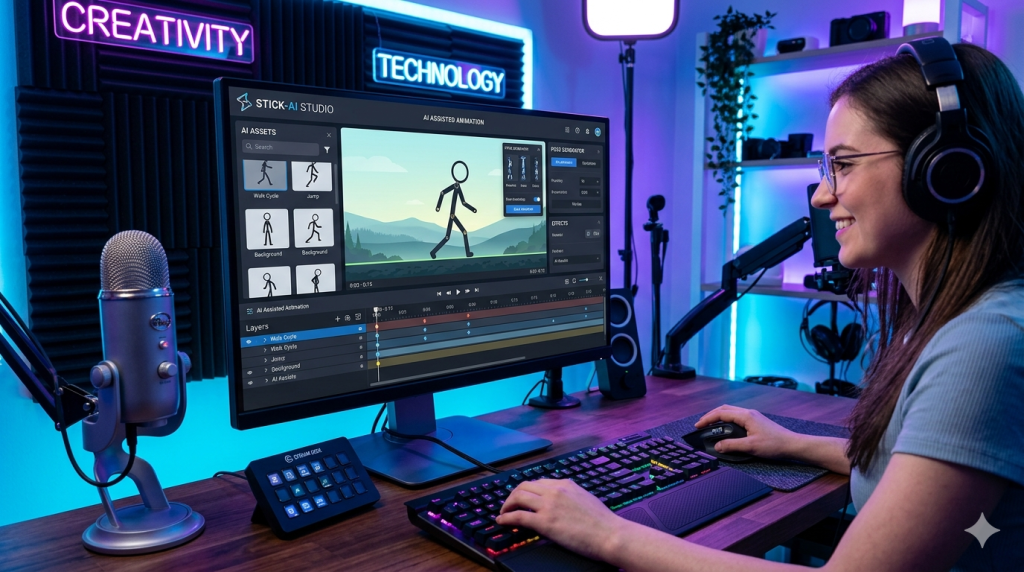
AI stickman animation is the process of using artificial intelligence tools to automatically generate and animate stick figures based on text prompts, images, or predefined movements.
Instead of manually drawing every frame, AI handles most of the work, including:
- Character creation
- Motion generation
- Scene design
- Voiceovers
- Video editing
- Background music
This allows anyone to create engaging stickman videos for YouTube, TikTok, educational content, storytelling, and entertainment.
Why Use AI for Stickman Animation?
Here are some major benefits:
1. Completely Free
Many AI animation tools offer free plans that are sufficient for beginners.
2. No Drawing Skills Required
You don’t need artistic talent to create professional stickman animations.
3. Faster Production
Create animations in minutes instead of days.
4. Beginner-Friendly
Most AI platforms use simple drag-and-drop interfaces.
5. Professional Results
AI-generated movements look smoother and more natural than traditional beginner animations.
Best Free AI Tools for Stickman Animation
1. ChatGPT
Use ChatGPT to generate:
- Story ideas
- Animation scripts
- Character dialogues
- Scene descriptions
2. Canva AI
Canva allows users to create animated scenes and videos with free AI features.
3. CapCut AI
CapCut offers:
- AI animation tools
- Auto captions
- AI voice generation
- Video effects
4. Leonardo AI
Perfect for generating stickman characters and backgrounds.
5. Pika Labs
Transform text prompts into animated videos using AI.
Step-by-Step: How to Create Stickman Animation with AI for Free
Master Prompt
ROLE
You are a professional AI YouTube content creator and visual storytelling expert specializing in simple stickman animations.
TASK
Create a complete ~59-second YouTube video on the topic:
[INSERT_TOPIC]
The video should be engaging, beginner-friendly, and easy to understand.
Total duration: 55–60 seconds
Divide the video into 10 scenes (approximately 6 seconds each).
OUTPUT FORMAT:
PART 1: Image Prompts (Paragraph Style)
Step 1 – Character Base Prompt
Before writing the scene prompts, first create a Stickman Base Design Prompt that matches the mood and theme of the story.
This base prompt should include:
Overall vibe (motivational, funny, stressed, calm, etc.)
Character style (simple black stickman, rounded head, clean lines)
Consistent features (expression style, line thickness, minimal design)
White or minimal background style
Format:
Stickman Base Prompt:
"Simple black stickman with a round head, clean smooth lines, minimalist style, expressive face, consistent proportions, modern flat illustration, minimal white background, soft emotional tone matching the story."
Step 2 – Scene Image Prompts
For each scene, write one paragraph.
Start every paragraph with:
"Use the same stickman character as before."
Then describe clearly:
• Pose (standing, sitting, walking, etc.)
• Action
• Facial expression
• At least one prop (required in every scene — examples: table, chair, clock, phone, book, laptop, etc.)
• Clean, simple background (plain white or minimal)
Guidelines:
• Aspect ratio MUST be 16:9
• Keep the character design identical across all scenes
• Only change pose, action, expression, or props
• Keep descriptions clear and visual (suitable for image generation)
PART 2: Motion / Animation Prompts
For each scene, provide short animation instructions.
Rules:
• Only animate: arms, head, facial expression, or props
• Body position remains mostly static
• Movements should be slow, natural, and minimal
• Mention emotion if relevant
Example style:
"Stickman slowly raises his arm to pick up the phone. Head tilts slightly. Calm movement. The body remains still."
PART 3: Voiceover Script
For each scene:
• Write short, engaging narration in simple English
• 1–2 sentences per scene
• Clearly describe:
• What the stickman is doing
• What he is thinking or feeling
• The purpose of the scene
• Include tone or emotion where relevant
• Keep the language natural and conversational
Format:
Scene 1:
Voiceover: "..."
GLOBAL RULES
• Same stickman character throughout the entire video
• Only pose, expression, or props change
• Keep everything simple, beginner-friendly, and easy to visualize
• Avoid complex backgrounds or camera movements
• Total scenes must fit a ~59-second video
• Output should be clearly structured and easy to copy for production
• Before generating, briefly think about:
• A clear beginning (hook)
• Middle (problem or explanation)
• End (resolution or takeaway)


Generate a short, engaging topic for a motivational or psychology-based video that inspires personal growth.
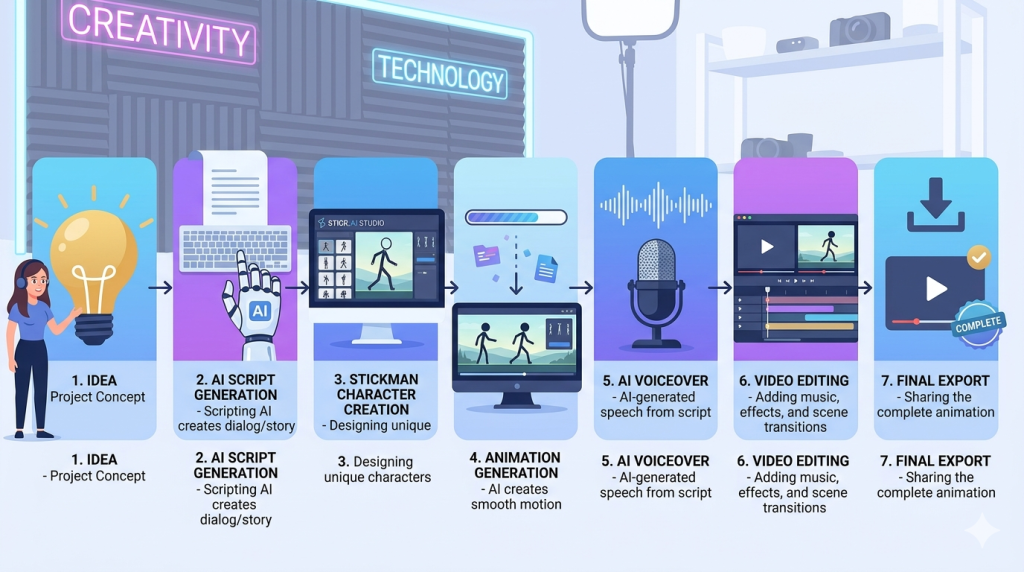
Step 1: Generate Your Story
Start with a simple concept.
Example prompt:
“Write a funny 1-minute stickman animation script about a student trying to pass an exam.”
AI can instantly generate:
- Characters
- Dialogue
- Storyline
- Scene breakdowns
Step 2: Create Stickman Characters
Use an AI image generator and enter prompts such as:
- Simple stickman superhero
- Funny stickman student
- Stickman warrior with sword
- Cartoon stickman businessman
Download the generated images.
Step 3: Generate Animation Scenes
Create scene descriptions like:
“Stickman walking through a city.”
“Stickman running from a giant robot.”
“Stickman celebrating after winning a race.”
Use AI video generators to convert these prompts into animated clips.
Step 4: Add AI Voiceovers
Most free AI voice tools allow you to paste your script and generate narration instantly.
Choose:
- Male voice
- Female voice
- Cartoon voice
- Narrator voice
Export the audio file.
Step 5: Edit Everything Together
Upload:
- AI-generated animations
- Voiceovers
- Background music
- Sound effects
into a free video editor like CapCut.
Add:
- Transitions
- Text effects
- Zoom effects
- Captions
Step 6: Export Your Video
Export in:
- 720p
- 1080p
- Vertical format for TikTok and Shorts
- Horizontal format for YouTube
Your stickman animation is now ready to publish.
Best AI Prompts for Stickman Animation
Use prompts like these for better results:
Action Scene Prompt
“Create a stickman fighting scene with cinematic camera movements, smooth animation, dramatic lighting, and dynamic action.”
Comedy Scene Prompt
“Funny stickman slips on a banana peel and accidentally becomes a hero.”
Educational Scene Prompt
“Stickman teacher explaining how the solar system works in a classroom.”
Storytelling Prompt
“Stickman explorer discovers a hidden treasure inside an ancient cave.”
How to Make Viral Stickman Animation Videos
To increase views and engagement:
Keep Videos Short
Aim for 30–90 seconds.
Use Strong Hooks
Grab attention within the first 3 seconds.
Add Captions
Many viewers watch without sound.
Use Trending Sounds
Trending audio can increase reach.
Upload Consistently
Post multiple videos weekly.
Common Mistakes to Avoid
Using Long Scripts
Shorter videos usually perform better.
Ignoring Sound Effects
Sound effects make animations more engaging.
Overcomplicated Stories
Simple stories are easier to understand.
Poor Prompt Writing
Detailed prompts produce better AI-generated animations.
Can You Monetize AI Stickman Animations?
Yes.
Many creators monetize stickman content through:
- YouTube Ad Revenue
- TikTok Creator Programs
- Affiliate Marketing
- Sponsorships
- Digital Products
- Online Courses
As long as your content is original and provides value, AI-generated stickman animations can become a profitable content niche.
Final Thoughts
Creating stickman animation with AI 100% free has never been easier. Modern AI tools can generate characters, scripts, animations, voiceovers, and video edits with minimal effort. Even complete beginners can produce engaging stickman videos for YouTube, TikTok, Instagram Reels, and educational content.
If you’re just getting started, focus on simple stories, use detailed AI prompts, and publish consistently. With practice, AI can help you create professional-quality stickman animations without spending a single dollar.
Frequently Asked Questions (FAQs)
Can I create stickman animations without drawing?
Yes. AI tools can generate both characters and animations automatically.
Are AI stickman animation tools free?
Many platforms offer free plans that are enough for beginners.
Which AI tool is best for stickman animation?
CapCut, Canva AI, Leonardo AI, and Pika Labs are among the most popular free options.
Can I upload AI stickman animations to YouTube?
Yes. Many creators successfully monetize AI-generated stickman videos on YouTube.
How long does it take to create a stickman animation?
With AI tools, a basic animation can be created in less than an hour.

