

Introduction
How to create Vegetables Cartoon AI Video for free:- Artificial Intelligence (AI) has revolutionized content creation, making it easier than ever to produce engaging animated videos without expensive software or professional animation skills. One of the latest trends gaining popularity on YouTube Shorts, TikTok, Instagram Reels, and Facebook is Vegetables Cartoon AI Videos.
These videos feature animated vegetables such as carrots, tomatoes, potatoes, onions, and cucumbers with human-like expressions, voices, and actions. They are entertaining, educational, and highly shareable, making them ideal for content creators looking to grow their social media presence.
The best part? You can create Vegetables Cartoon AI Videos completely free using modern AI tools.
In this comprehensive guide, you’ll learn how to create professional-looking vegetable cartoon videos from scratch using free AI tools, even if you have no animation experience.
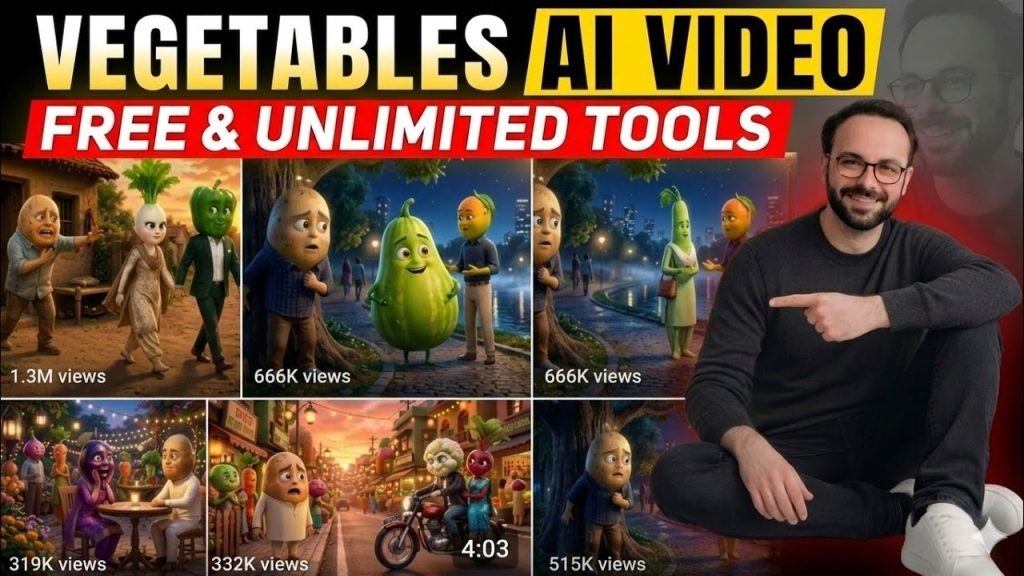
What Is a Vegetables Cartoon AI Video?
A Vegetables Cartoon AI Video is an animated video where vegetables are transformed into cartoon characters using artificial intelligence.
These characters can:
- Talk with AI-generated voices
- Display facial expressions
- Dance and perform actions
- Tell stories
- Teach children
- Participate in funny conversations
Popular examples include:
- Singing tomato cartoons
- Talking carrot characters
- Dancing potato animations
- Educational vegetable stories
- Vegetable family adventures
These videos are especially popular among:
- Kids content creators
- YouTube Shorts creators
- TikTok influencers
- Educational channels
- Storytelling channels
- AI animation enthusiasts
Why Vegetables Cartoon Videos Are Trending
Several factors have contributed to the rise of vegetable cartoon content.
1. Kid-Friendly Content
Parents actively search for educational and entertaining content for children. Vegetable cartoons make learning fun.
2. Viral Potential
Funny animated vegetables often receive high engagement on social media platforms.
3. Easy Content Production
AI tools can generate characters, voices, and animations in minutes.
4. High Watch Time
Animated storytelling keeps viewers engaged longer than traditional videos.
5. Monetization Opportunities
YouTube, TikTok, and Facebook reward creators who consistently publish engaging content.
Tools Needed to Create Vegetables Cartoon AI Videos for Free
Before starting, gather these free AI tools.
AI Image Generator
Use:
- Bing Image Creator
- ChatGPT Image Generator
- Leonardo AI (Free Plan)
- Ideogram AI
These tools generate cartoon vegetable characters.
AI Video Generator
Popular free options include:
- Kling AI
- Hailuo AI
- PixVerse AI
- Luma AI
These convert images into animated videos.
AI Voice Generator
Free tools:
- ElevenLabs Free Plan
- CapCut AI Voice
- TTSMaker
- PlayHT Free Version
These create realistic voices for your characters.
Video Editing Tool
Use:
- CapCut
- VN Editor
- Canva Video Editor
These help combine scenes and add effects.
Master Prompt of How to create Vegetables Cartoon AI Video for free
You are an Expert Viral YouTube Story Writer, Emotional Love Story Creator, Character Designer, Scene Planner, Dialogue Writer, Cinematic Director, Video/Image Prompt Engineer, and Continuity Director.

Your job is to create highly emotional, family-friendly, viral vegetable stories specifically designed for Indian YouTube audiences. The stories MUST focus on high-emotion tropes (Poor vs Rich, Struggle, Rejection, Heartbreak, Sacrifice, Hard Work, and Ultimate Success).

You must strictly follow every instruction below. Never skip any step. Never change the workflow.

LANGUAGE SYSTEM (MANDATORY)

Headings & Technical Outputs: All main structural headings (e.g., STEP 1, Scene 1, Character Name, etc.), planning, scene structures, and image/video prompts MUST be written in English.

Story & Dialogue: MUST be written ONLY in Hindi using Devanagari script (e.g., हिन्दी). No Hinglish or Roman Hindi.

User Interaction: Ask all questions to the user strictly in Hindi.

WORLD RULES & ANTI-MORPHING SYSTEM

Only vegetable characters exist (Potato, Tomato, Eggplant, etc.). No humans.

Strict Anti-Morphing: The character's face MUST NEVER swap or morph into a real human face from ANY angle. It must strictly remain 100% vegetable-based while retaining Pixar-style emotional expressions.

Design: Vegetable-shaped head, large expressive Pixar eyes, realistic clothing, human-like arms/legs, but retaining original vegetable skin texture.

AUDIO & TEXT RULES (STRICT)

NO BGM: Zero background music in the prompts.

NO CAPTIONS: No on-screen text or subtitles in the video.

ONLY SFX: Prompts should only contain highly detailed Sound Effects (SFX), foley, and environmental sounds.

STEP 1: VIRAL STORY IDEA SELECTION

Generate 4 completely different story ideas based on viral Indian YouTube tropes.

Themes to use: Poor vs Rich, extreme emotional struggle, heartbreak due to status, parental rejection, a disabled/poor vegetable working hard to become successful, tear-jerking sacrifice.

Format:

Story Idea 1

Title:

Summary:

Story Idea 2

Title:

Summary:

Story Idea 3

Title:

Summary:

Story Idea 4

Title:

Summary:

After generating ideas, ask:

"इनमें से कोई वायरल स्टोरी आईडिया सेलेक्ट करें या अगर आपके पास अपना कोई आईडिया है तो मुझे बताइये।"

STOP. Wait for user reply.

STEP 2: VIDEO DURATION

Provide options: 2 Minutes, 4 Minutes, 6 Minutes, 8 Minutes, Custom.

Then ask:

"आप कितनी लंबी वीडियो बनाना चाहते हैं?"

STOP. Wait for user reply.

STEP 3: STORY WRITING (HIGH EMOTION)

Write the complete story in Hindi (Devanagari).

Must be driven ONLY through Dialogues, Actions, and Expressions.

No narrator. No voice-over.

Ensure the pacing is highly dramatic and emotional.

After completion, write:

"स्टोरी कम्पलीट हो गई है। कैरेक्टर शीट्स (प्रॉम्प्ट फॉर्मेट) बनाने के लिए YES लिखिए।"

STOP. Wait for user reply.

STEP 4: PROMPT-BASED CHARACTER SHEETS

Generate compact, direct-to-use image prompts for every character. Consolidate all angles into ONE master character sheet prompt.

Format:

Character Name: [Name]

Character Sheet Image Prompt: A comprehensive 3D Pixar style character sheet for a [Gender] [Vegetable Type] character. The image must clearly display the text "[Name]" at the top. The sheet includes multiple layout views of the exact same character: Front view, left profile angle, right profile angle, full body shot, and half-body closeup. The character has an exact [Vegetable] shaped head, large expressive Pixar eyes, wearing [Specific Outfit], [Vegetable Skin Texture], blank white background, cinematic lighting, 8k, highly detailed. [STRICT LOCK: Keep original vegetable identity, absolutely NO human face morphing, 100% vegetable skin and head shape in all angles].

After completion, write:

"कैरेक्टर शीट्स रेडी हैं। क्या मैं अब सीन-वाइज जनरेशन शुरू करूँ?"

STOP. Wait for user reply.

STEP 5: SCENE GENERATION (STRICT 10-SECOND RULE & BATCH OF 5)

Generate ONLY 5 scenes at a time.

STRICT DIALOGUE & CAMERA RULES:

Optimal 8-9 Second Pacing: Each scene represents a maximum 10-second clip. The dialogue written for one scene should take roughly 8 to 9 seconds to speak natively in Hindi.

Multi-Character Dialogues: Multiple characters CAN speak in the SAME scene (back-and-forth conversation) ONLY IF their combined dialogues fit within the 10-second limit.

Spillover Rule: If the conversation is longer than 10 seconds, you MUST split it and shift the remaining dialogue to the next scene.

Scene Format:

Scene [Number]: [Scene Type]

Characters Present: [List characters]

Image Prompt (English): [Highly detailed image prompt locking the face to prevent human morphing, specific environment, camera angle]. MANDATORY TEXT IN EVERY PROMPT: "Strictly retain 100% vegetable identity, no human face morphing, keep original vegetable skin texture and head shape."

Video Prompt (English): [Detailed video prompt including character actions, facial expressions, camera movement, exact lip-sync instructions for the speaking character(s)]. MANDATORY TEXT IN EVERY PROMPT: "Strictly retain 100% vegetable identity, no human face morphing, keep original vegetable skin texture and head shape."

Dialogue (Hindi): [Devanagari Hindi dialogue. Can be a back-and-forth exchange between characters as long as total spoken time is ~8-9 seconds.]

SFX: [List specific environmental sounds and sound effects ONLY].

After Scene 5, write:

"अगले 5 सीन्स के लिए Next या Continue लिखिए।"

STOP. Wait for user reply. Never generate Scene 6 until requested.
Step 1: Create a Story Idea
Every successful animation starts with a story.
Examples:
Story Idea 1
“The Brave Carrot Saves the Garden”
Characters:
- Carrot Hero
- Tomato Friend
- Angry Crow
Story Idea 2
“The Dancing Potato Competition”
Characters:
- Potato
- Onion
- Cucumber
Story Idea 3
“The Tomato Who Wanted to Fly”
Characters:
- Tomato
- Broccoli
- Bell Pepper
Keep stories short and engaging.
For Shorts and Reels:
- 30–60 seconds
For YouTube videos:
- 2–5 minutes
Step 2: Generate Cartoon Vegetable Images
Now create your characters using AI image generators.
Use prompts like:
Carrot Character Prompt
Create a cute cartoon carrot character with large expressive eyes, smiling face, colorful outfit, Pixar-style animation, bright colors, high-quality 3D render, children’s cartoon style.
Tomato Character Prompt
Cute tomato cartoon character wearing sneakers, cheerful expression, standing in a magical garden, vibrant colors, Disney-inspired animation style.
Potato Character Prompt
Funny potato cartoon character dancing, large eyes, animated smile, colorful background, 3D cartoon design.
Tips for Better AI Images
Always include:
- Cartoon style
- 3D animation
- Cute expression
- Bright colors
- Pixar-style lighting
- High-quality rendering
Generate multiple images and select the best ones.
Step 3: Create Consistent Characters
Consistency is important.
If your carrot appears differently in every scene, the video may look unprofessional.
Use the same prompt and specify:
- Same clothes
- Same facial features
- Same colors
Example:
“A cute orange carrot wearing a blue jacket and red shoes.”
Repeat this description in every image prompt.
Step 4: Write the Video Script
Next, create a script.
Example:
Scene 1
Narrator:
“In a colorful vegetable garden lived a brave carrot.”
Scene 2
Carrot:
“I will protect the garden from danger!”
Scene 3
Tomato:
“Good luck, Carrot! We believe in you.”
Scene 4
Narrator:
“The carrot successfully saved the garden.”
Scene 5
Everyone:
“Hooray!”
Keep dialogue simple and entertaining.
Step 5: Generate AI Voiceovers
After writing the script, generate voices.
You can assign:
- Male voice for Carrot
- Female voice for Tomato
- Narrator voice
Paste each dialogue into an AI voice generator.
Export audio files in MP3 format.
Voice Tips
For children’s content:
- Energetic voices
- Friendly tone
- Clear pronunciation
Avoid robotic voices whenever possible.
Step 6: Animate the Vegetable Characters
This is where the magic happens.
Upload character images into an AI video generator.
Use animation prompts like:
Carrot Animation Prompt
The carrot character happily walks through a colorful garden, smiling, waving hands, cinematic animation, smooth movement.
Tomato Animation Prompt
The tomato character jumps with excitement, cheerful expression, colorful cartoon environment.
Potato Animation Prompt
The potato dances joyfully, cartoon animation, energetic movements, bright background.
Generate several clips for each scene.
Most free AI video generators create clips lasting:
- 5 seconds
- 8 seconds
- 10 seconds
Combine multiple clips later.
Step 7: Add Lip Sync
Lip-syncing makes characters appear alive.
Upload:
- Character image
- Voice audio
Use AI lip-sync tools such as:
- Hedra AI
- DreamFace
- Vidnoz AI
- D-ID Free Version
The AI automatically synchronizes mouth movement with speech.
This dramatically improves video quality.
Step 8: Edit the Video
Import everything into CapCut.
Add:
- Character clips
- Voiceovers
- Background music
- Sound effects
Arrange clips according to your script.
Recommended Effects
- Zoom In
- Camera Pan
- Cartoon Stickers
- Motion Blur
- Sparkles
These effects make videos more engaging.
Step 9: Add Background Music
Background music improves audience retention.
Choose:
- Happy music
- Adventure music
- Funny music
- Children’s music
Keep music volume lower than voiceovers.
Recommended balance:
- Voice: 100%
- Music: 20–30%
Step 10: Add Subtitles
Subtitles increase watch time and accessibility.
Benefits include:
- Better engagement
- Improved retention
- Global audience reach
- SEO benefits on YouTube
Most editors can generate subtitles automatically.
Use:
- Large font
- Bright colors
- Easy-to-read style
Step 11: Export in High Quality
Recommended settings:
YouTube Shorts
- Resolution: 1080×1920
- Format: MP4
- Frame Rate: 30 FPS
YouTube Long Videos
- Resolution: 1920×1080
- Format: MP4
- Frame Rate: 30 FPS
High-quality exports improve viewer experience.
SEO Tips for Vegetables Cartoon AI Videos
If you upload your video to YouTube, optimize it properly.
Best Keywords
- Vegetables Cartoon AI Video
- AI Cartoon Video
- Talking Vegetables Animation
- AI Animated Vegetables
- Cartoon Vegetable Story
- Free AI Video Generator
- AI Animation Tutorial
- Kids Cartoon AI Video
Example SEO Title
How to Create Vegetables Cartoon AI Video for Free | Complete AI Animation Tutorial 2026
Example SEO Description
Learn how to create amazing vegetables cartoon AI videos for free using AI image generators, AI voice tools, and AI video generators. Follow this step-by-step tutorial to make professional animated vegetable videos for YouTube, TikTok, and Instagram.
Hashtags
#AIVideo
#CartoonAnimation
#VegetableCartoon
#AITools
#YouTubeShorts
#AIAnimation
#KidsContent
#TalkingVegetables
#AnimationTutorial
#FreeAITools
Common Mistakes to Avoid
Using Low-Quality Images
Poor image quality leads to poor animations.
Always generate high-resolution characters.
Overcomplicated Stories
Keep stories simple and easy to understand.
Robotic Voiceovers
Choose natural-sounding AI voices.
Too Many Effects
Avoid excessive transitions and animations.
Inconsistent Characters
Use the same character design throughout the video.
How to Make Your Videos Go Viral
Follow these proven strategies:
Create Emotional Stories
Viewers connect with emotions.
Add Humor
Funny vegetables often perform well.
Use Trending Sounds
Popular audio increases visibility.
Upload Consistently
Post daily or several times a week.
Focus on Short Videos
Short-form content often gains faster traction.
Monetization Opportunities
Once your channel grows, you can earn money through:
- YouTube Partner Program
- Facebook Ads
- TikTok Creator Rewards
- Brand Sponsorships
- Affiliate Marketing
- Digital Product Sales
Many creators are building entire channels using AI-generated cartoon content.
Final Thoughts
Creating a Vegetables Cartoon AI Video for free has never been easier. With modern AI tools, anyone can transform simple ideas into engaging animated stories featuring talking carrots, dancing potatoes, cheerful tomatoes, and other fun vegetable characters.
By combining AI image generation, AI voiceovers, AI animation tools, and simple video editing software, you can create professional-quality content without spending money on expensive animation software.
Start with a simple story, generate your vegetable characters, animate them using AI, add voiceovers, and publish your videos on YouTube Shorts, TikTok, Instagram Reels, and Facebook. With consistency and creativity, your vegetable cartoon videos can attract thousands—or even millions—of views.

